


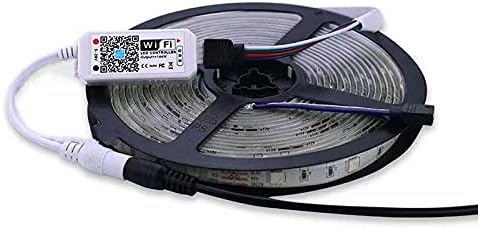


FUNNYFOX Smart WiFi Wireless Controller, Wi-Fi Control Box for RGB LED Strip Light, Compatible with Alexa Google Home IFTTT, App Control for Android,iOS System (2)
See current price
Check the current price and availability on Amazon.com.
View on AmazonAffiliate link — we may earn a commission at no extra cost to you. Learn more
- Brand
- FUNNYFOX
- Light Source Type
- LED
- Light Color
- RGB
- Theme
- Indoor
Key features
- Wifi LED Controller Compatible with Alexa & Google Assistant - Voice Controlled, works with Alexa, Google, IFTTT; speak out your demand, you can control your light strip through voice commands: turn on/ off, change the color, dim/brighten the light strip
- Music Sync - Turn on the "Mic" mode on your "Magic Home" App, then switch to any other App and play music on your phone, your strip lights will sync to the music; great for entertaining and parties
- Smart WiFi RGB Control - Turn any RGB strip lights into a smart light: save lighting presets, timers and control all your WiFi motivated lights from one APP; change colors and get full control of your RGB lights from your phone with this simple WiFi control box via a free App "Magic Home" for both iOS and Android users
- WiFi Requirements - In order to use WiFi control, make sure you are using a 2.4Ghz network; the kit includes 1 Wifi controller, 1 mini IR remote and 1 4-pin connectors, user-friendly easy installation, plug and play
- Group Management - You could add many controllers in your house, control each light strip controller individually or many at the same time as a group by assigning to groups as follow your needs
Specifications
| Color | RGB (Red, Green, Blue) |
|---|---|
| Brand | FUNNYFOX |
| Light Source Type | LED |
| Light Color | RGB |
| Theme | Indoor |
| Occasion | Christmas |
| Style | Modern |
| Material | Metal |
| Controller Type | App Control |
| Connectivity Protocol | Wi-Fi |
| Number of Light Sources | 150 |
| Wattage | 12 watts |
| Number of Items | 2 |
| Control Method | App, Voice |
| Manufacturer | FF |
| Part Number | FF-CONTROLLER |
| Item Weight | 3.52 ounces |
| Package Dimensions | 4.09 x 4.09 x 2.05 inches; 3.53 Ounces |
| Item model number | FF-CONTROLLER |
| Batteries | 1 Lithium Metal batteries required. (included) |
| Batteries Included? | Yes |
| Batteries Required? | Yes |
| ASIN | B0BGCBZ4WD |
About this product
This smart wi-fi led controller control the Red, Green and Blue channels to mix colors and create the color changing effects of the strip. The free App "Magic Home" enables you to change brightness, color and save certain presets or timers for your lights. Specifications WiFi RGB Control: Control lights with Phone, Voice Assistant or other devices. "Magic Home" Smart Control: One App enables your RGB strip lights to life: full customized RGB control, preset effects, timing function, music sync Voice Control: Compatible with Alexa, Google, IFTTT. Input Voltage: 12Vdc (5-24V) WiFi Requirements: 2.4gHz Network To setup with WiFi network and App, follow instructions below. If you are ready to pair the controller, scan the App QR code or search for 'Magic Home Pro' within your App Store. In order to use WiFi control, make sure you are using a 2.4Ghz network . After APP is installed, sign into or create a Magic Home Account. Allow location services Click Add Device '+' within App Select network for LED controller (LEDxxxxxx) Wait for App to connect to controller, once it does follow App prompt to switch WiFi to controller network and then return to App. Select Router WiFi network and enter the password when prompted. App will connect the controller to the WiFi network and you are all set. For more specific instructions on setting up with Google Home Assistant or Amazon Echo, see the full product manual. Package content 2*Wi-Fi controller 2*20-key remote control 2*user manual
Similar products


See current price