

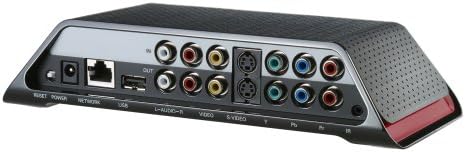


Sling Media Slingbox SOLO (SB260-100) (Old Model)
See current price
Check the current price and availability on Amazon.com.
View on AmazonAffiliate link — we may earn a commission at no extra cost to you. Learn more
- Item Weight
- 2.2 pounds
- Item model number
- SB260-100
- Batteries
- 1 Lithium Ion batteries required.
- Manufacturer
- Sling Media
Key features
- Watch your HDTV anywhere on your laptop or mobile phone with no monthly fees
- Watch and control a high-definition or standard definition A/V device, such as a DVR, cable set top box, satellite receiver or DVD player.
- Full set of pass-through connections for easy integration with virtually any A/V device.
- Clip+Sling ready. Use your Slingbox to clip segments of your favorite TV programs and share them with friends and family online.
- Supports Windows XP/Vista, Mac and Windows Mobile, Symbian or Palm OS-based mobile devices.
Specifications
| Product Dimensions | 11.6 x 9.6 x 3.5 inches |
|---|---|
| Item Weight | 2.2 pounds |
| Item model number | SB260-100 |
| Batteries | 1 Lithium Ion batteries required. |
| Manufacturer | Sling Media |
| Number of Batteries | 1 Lithium Ion batteries required. |
| Brand | Sling Media |
| Battery Cell Composition | Lithium Ion |
| Recommended Uses For Product | Laptop,Tv,Watch |
| Unit Count | 1.0 Count |
| ASIN | B000VXKD8K |
About this product
Product Description The Slingbox SOLO incorporates high-definition component, S-Video and composite video inputs as well as outputs, making it compatible with just about every HD or standard-definition satellite receiver or set-top boxes and DVRs on the market. The Slingbox SOLO is the perfect companion for your DVR, cable box, satellite receiver or DVD player. With the ability to watch and control your favorite TV source, the Slingbox SOLO ensures that you can enjoy your TV entertainment anywhere.What's in the box: Sling Box Slingbox Solo Internet TV Broadcaster, AC Adapter, Ethernet Cable, Quick Start Guide, Composite AV Cable, Remote Control IR Cable and 1-Year Limited Warranty. From the Manufacturer Slingbox turns your PC, Mac, tablet or smartphone into a TV. Never miss your home TV shows, regardless of where you are. Take your TV with you on the road. Easily connect the Slingbox SOLO to practically any one of your home-theater sources and watch your standard-definition (SD) or high-definition (HD) TV shows, sporting events or special programs on your PC, Mac, tablet or smartphone* over the internet, from anywhere in the world. Easily Connect Connect to one HD or SD source in your home theater, such as your DVR, digital cable set-top box or satellite receiver. Take Control Take complete control of your TV via the web with the comprehensive and easy-to-use on-screen remote control and electronic program guide (EPG). Sit Back and Enjoy Watch your favorite shows in crisp SD quality over the Internet via your PC, Mac, tablet or smartphone—from anywhere, anytime. No Monthly Fees Watch and control your TV and its programming on your compatible device with no monthly subscription fee.* *Download sold separately. Additional fees from your mobile provider may apply. Connections Getting Started with Slingbox SOLO is Simple Connect the Slingbox to an A/V source, such as a DVR, cable set-top box or satellite receiver (The Slingbox is compatible with just about any AV source.) Connect the Slingbox to an A/V source, such as a DVR, cable set-top box or satellite receiver (The Slingbox is compatible with just about any AV source.) Connect the Slingbox to your home network (If your router is too far from your Slingbox for a direct connection, use the SlingLink TURBO or another Ethernet bridge for connectivity.) Connect the Slingbox to your home network (If your router is too far from your Slingbox for a direct connection, use the SlingLink TURBO or another Ethernet bridge for connectivity.) Fire up your PC or Mac computer from your home-network connection, complete the Slingbox setup and enjoy your very own home theater on your PC, Mac, tablet or smartphone. Fire up your PC or Mac computer from your home-network connection, complete the Slingbox setup and enjoy your very own home theater on your PC, Mac, tablet or smartphone. What Devices Can I Connect? Basic Cable TV Set-Top Box Basic Cable TV Set-Top Box Digital Cable Set-Top Box Digital Cable Set-Top Box DVRs (such as TiVo, Comcast, ReplayTV, DISH or one provided by your cable/satellite provider) DVRs (such as TiVo, Comcast, ReplayTV, DISH or one provided by your cable/satellite provider) Blu-ray Disc™ Player/Recorder Blu-ray Disc™ Player/Recorder HD Component Input Support with Resolution Up to 1080i HD Component Input Support with Resolution Up to 1080i Satellite Receiver such as DIRECTV or DISH Satellite Receiver such as DIRECTV or DISH Video/Security Camera Video/Security Camera Windows Media Center Windows Media Center What do I need to watch on my laptop? Watch and control your TV directly from Slingbox.com. Using Firefox, Internet Explorer or Safari, you have complete access to your Slingbox and its connected cable box, satellite receiver or DVR. You get a virtual remote control as well as a searchable TV guide—all without downloading or installing desktop software. Virtual Program Guide and Remote Control View all of your television programming with the virtual program guide. With the on-screen remote control, change channels, pause, fast-forward or rewind and set up DVR recordings. Popup Video Player Multitask while watching your TV, or if you prefer, watch your TV in full-screen mode. PC and Mac Support Access your Slingbox from any high-speed Internet-connected PC or Mac laptop or desktop. What do I need to watch on my smartphone or tablet? With SlingPlayer software (sold separately) watch your TV and all of its programming on your iPad, iPhone, BlackBerry, Android phone, Android tablet, Windows Phone, Palm OS or Symbian mobile devices. Full Control of Your Home TV Control your programming with easy-to-use menus and shortcuts on either a touch screen or navigational interface. Easily change your TV channels, navigate program guides and schedule recordings on your DVR. Easy Access to a Wide Range of Devices and Programs Control your digital cable box, satellite receiver, DVR or DVD player. Access music channels or video on demand. High-Quality Viewing Modes Enjoy stunning full-screen video. Switch to audio-only mode to save bandwidth or battery life. Adjust the video display size or aspect ratio. ( Audio-only mode and adjustable video display size are only supported on select devices. ) Take Advantage of High-Speed Mobile Internet Connectivity Access your television programming over a high-speed 3G, 4G or Wi-Fi connection. ( Check your mobile device and service for supported connectivity options. Some Android phones and tablets support 4G connections. The iPod touch only supports Wi-Fi connections. )
Similar products


See current price