

Biometrics for Security and Access Control
Compare biometric security products by authentication method, compatibility, installation requirements, and access-control features before checking current availability on Amazon.
19 products in catalog
19 results
Filters

Kensington
Kensington VeriMark Desktop USB Fingerprint Key Reader - Windows Hello, FIDO U2F, FIDO2 (K62330WW)
See current price


Lightning Powder
LIGHTNING POWDER Product Title Zephyr Fiberglass Fingerprint Brush, 6.5 in, Professional Fingerprint Dusting
See current price


Verifi Smart.Safe.
Verifi P2000 Desktop USB Fingerprint Reader - Windows Hello, Windows Password Free Operation
See current price


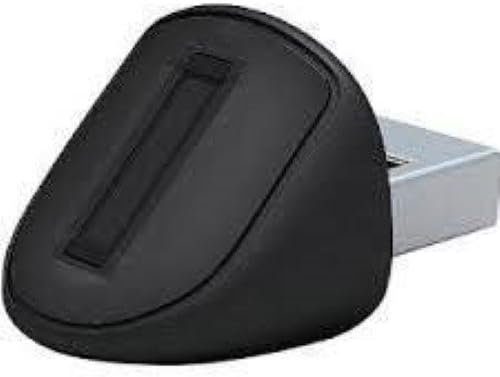
Cogitable Solutions LLC
Fingerprint Reader for Microsoft Windows Login and NEW Windows 10 Hello - Sign-in to Windows Using Your Finger - Remember Your Windows Password
See current price
Popular brands in Biometrics
Biometric security products use measurable characteristics—such as fingerprints, facial features, or other identity markers—to help authenticate a person. They can be used for access control, device security, time and attendance, or identity verification, depending on the product and its compatible software.
This K-Catalog page helps shoppers compare specifications and features across biometric products from brands represented in the catalog. Review the product details carefully to determine whether a device fits a home, office, commercial facility, or specialized security setup.
How to choose biometric security equipment
Start by identifying what the product needs to protect and how people will use it. A device for a single computer or door may have different requirements from equipment intended for multiple users or integration with an existing security system.
Consider these questions before comparing models:
- What is being secured? Determine whether the device is intended for a computer, door, cabinet, network, timekeeping system, or another access point.
- Which biometric method is suitable? Fingerprint recognition is common for personal authentication, while facial or other methods may better suit hands-free access or particular environments.
- How many users need access? Check the supported user capacity and whether profiles can be added, removed, or managed by an administrator.
- What installation is required? Confirm whether the product is designed for desktop use, wall or door installation, or integration with existing hardware.
- What happens if authentication fails? Look for available backup access methods and administrative controls where continuity is important.
For a broader look at security equipment, browse the Security & Surveillance category.
Types of biometric products to compare
Biometric equipment varies by authentication method and intended role. The product description should clarify what is included and how the device is used.
Fingerprint readers and scanners
Fingerprint devices compare a scanned fingerprint with an enrolled profile. They may be used for computer login, access control, identity verification, or other applications. Compare the connection type, operating-system compatibility, enrollment process, and software requirements. The scanner’s placement and the way users present a finger can also affect everyday convenience.
Biometric locks and access-control devices
These products are designed to control entry to a door, room, cabinet, or other secured area. Check whether the product is intended for a particular door configuration and whether it requires additional hardware, wiring, a hub, or an access-control platform. Pay attention to supported credentials, administrative access, emergency entry provisions, and power requirements.
Facial and other identity-recognition systems
Some biometric systems use facial characteristics or another identifying feature rather than a fingerprint. Compare the stated operating conditions, enrollment process, user-management tools, and compatibility with related security equipment. Privacy, placement, lighting, and the environment in which recognition takes place may be especially important considerations.
Key specifications and features
Product specifications can differ substantially, even when two devices serve a similar purpose. Focus on the details that affect compatibility and routine operation:
- Authentication technology: Confirm the biometric method and whether the product supports additional credentials.
- Connectivity: Check wired and wireless requirements, connection ports, network compatibility, and whether a separate controller is needed.
- Software support: Verify operating-system compatibility, management software, mobile-app requirements, and supported integrations.
- User administration: Look for enrollment, deletion, permissions, audit tools, and administrator controls if multiple users will be managed.
- Power and installation: Review power-source requirements, mounting information, cabling, and whether installation accessories are included.
- Environmental suitability: For equipment used near an entrance or in a demanding setting, examine the stated operating conditions and enclosure information.
- Fallback access: Determine how authorized users can enter or authenticate if a fingerprint cannot be read or the device is unavailable.
If biometric equipment is only one part of a larger setup, related Home Security Systems and Surveillance Video Equipment may help complete the system.
Brands represented in the catalog
Biometric products in the catalog include brands such as UPEK, Verifi Smart.Safe., ZKTeco, Cogitable Solutions LLC, Kensington, Lightning Powder, ULTRALOQ, Arlo, SecuGen, ARDWOLF, Identicator Fingerprint Systems, and Kbyte. Brand presence is not an endorsement, so compare the specifications, compatibility information, included components, and support details for each individual product.
For related installation parts and supporting equipment, browse Security & Surveillance Accessories. Other security categories, including Motion Detectors, may also be relevant when building a broader protection system.
Frequently asked questions
What are biometric security products used for?
They are used to help verify identity for purposes such as access control, computer login, identity management, and other security applications.
Are biometric devices compatible with every computer or security system?
No. Compatibility depends on the connection, operating system, software, access-control hardware, and installation requirements. Check the full product specifications before buying.
What should be considered when choosing a fingerprint device?
Compare the supported software, connection type, enrollment and user-management features, installation needs, power requirements, and any backup authentication method.
Are biometric locks suitable for every door?
Not necessarily. Door construction, lock configuration, power availability, mounting space, and access-control requirements all affect suitability. Review the product’s installation information carefully.
What if a biometric scan does not work?
Look for products that provide an authorized backup method or administrator override. The available fallback options vary by product and should be checked before purchase.
Where can shoppers check current availability?
After comparing specifications and features on K-Catalog, shoppers can follow through to Amazon to check the current product details and availability.