


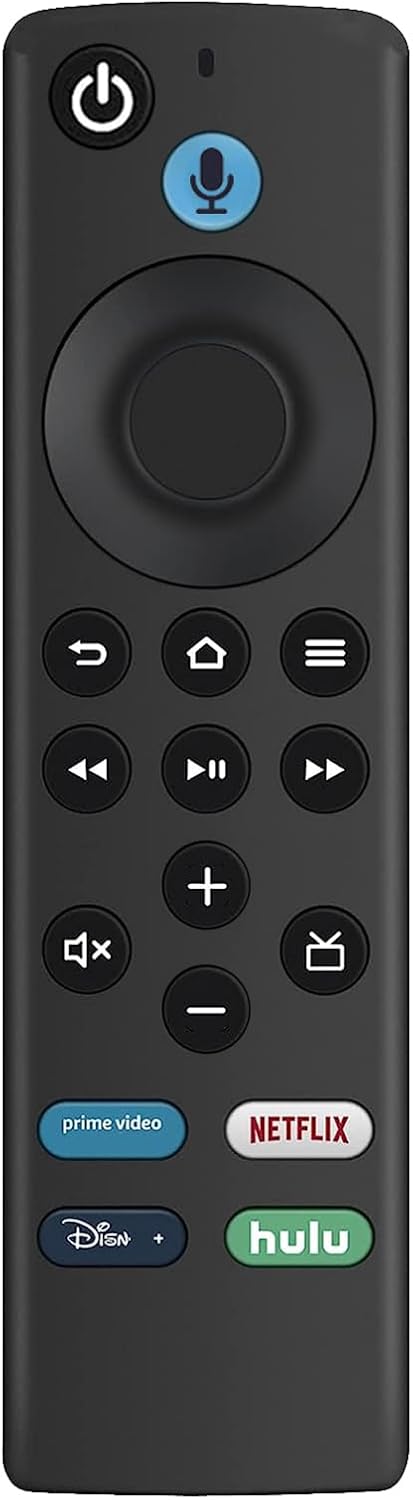
Allimity L5B83G Replacement Voice Remote Control fit for Amazon TV Stick Lite, Amazon TV Stick (2nd Gen & 3rd Gen), Amazon TV Stick 4K, Amazon TV Cube (1st Gen & 2nd Gen), and Amazon TV (3rd Gen)
See current price
Check the current price and availability on Amazon.com.
View on AmazonAffiliate link — we may earn a commission at no extra cost to you. Learn more
- Item Weight
- 1.41 ounces
- Item model number
- AMT-AMZ-PNDH-3BOX-L5B83G-VC
- Batteries
- 2 AAA batteries required.
- Manufacturer
- ALLIMITY inc
Key features
- Compatible With: ① Amazon TV Stick Lite; ② Amazon TV Stick (2nd Gen); ③ Amazon TV Stick (3rd Gen); ④ Amazon TV Stick 4K; ⑤ Amazon TV Stick 4K Max; ⑥ Amazon TV Cube (1st Gen); ⑦ Amazon TV Cube (2nd Gen); ⑧ Amazon TV (3rd Gen).⑨ Amazon TV Stick 4K Bundle;
- Not compatible with: ① Amazon TV (1st Gen); ② Amazon TV (2nd Gen); ③ Amazon TV Stick (1st Gen); ④ Amazon TV Edition smart TVs(Such as Toshiba/Insignia/Westinghouse/Element).
- Pairing Your Voice Remote: ① Press and Hold the Home button about 10-15 seconds, then Release when the LED starts to rapidly flash; ② Waiting about 30-60 seconds (Entering Pairing mode, LED Flash), then remote should automatically Pair with your device.
- About TV controls Function: ① Get to find, launch and control content, or even switch to cable via Simply Voice Control; ② With 4 Preset App Buttons - Prime Video, Netflix, Disney+, and Hulu, make it easier to get to favorite apps; ③ With Power and Volumn buttons to control your compatible TV, soundbar, and Receiver.
- Note: If you have any doubt or troubles about the voice remote you received, please contact us timely via Amazon Message tool, we will reply to you with 24 hours and try our best to help you solve each issue.
Specifications
| Product Dimensions | 6 x 2 x 0.6 inches |
|---|---|
| Item Weight | 1.41 ounces |
| Item model number | AMT-AMZ-PNDH-3BOX-L5B83G-VC |
| Batteries | 2 AAA batteries required. |
| Manufacturer | ALLIMITY inc |
| Country of Origin | China |
| Brand | ALLIMITY |
| Special Feature | Ergonomic |
| Color | Black |
| Max Number of Supported Devices | 1 |
| Compatible Devices | Television, Streaming Device |
| ASIN | B09KV14PCT |
About this product
New Replacement L5B83G Voice Remote Control fit for Amazon TV Device - 2021 Release. Compatible with: ① Amazon TV Stick 4K; ② Amazon TV Stick Lite; ③ Amazon TV Stick 4K Max; ④ Amazon TV Stick (2nd Gen); ⑤ Amazon TV Stick (3rd Gen); ⑥ Amazon TV Cube (1st Gen); ⑦ Amazon TV Cube (2nd Gen); ⑧ Amazon TV (3rd Gen). ⑨ Amazon TV Stick 4K Bundle. Not Compatible with: ① Amazon TV (1st Gen); ② Amazon TV (2nd Gen); ③ AmazonTV Stick (1st Gen); ④ Amazon TV Edition smart TVs (Such as Toshiba/Insignia/Westinghouse/Element). About Remote Paring: Press and Hold the Home button about 10-15 seconds, then Release when the LED starts to rapidly flash, waiting about 30-60 seconds (Entering Pairing mode, LED Flash), then remote should automatically Pair with your device. About Remote Reseting: Having trouble with your remote, first remove and reinsert the new alkaline batteries in your remote. then Reset your remote as below: Place your remote within 10 feet of your Amazon TV device. ① Press the Left, Menu, and Back buttons simultaneously, and hold for 10 seconds. ② Wait for 60 seconds. ③ Remove the batteries from your remote, unplug your Amazon TV device, and wait 60 seconds. ④ Plug your Amazon TV device back in, and wait for the Home Screen to display. ⑤ Press the Home button and Hold about 10-15 seconds, Until the LED starts to rapidly flash then release, waiting about 30-60 seconds(Entering Pair mode, LED Flash), then the remote should automatically pair with your device. ⑥ IF still not Pair success, please repeat the above ①-⑤ steps again.
Similar products


See current price