



Brother
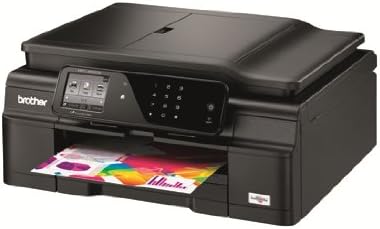
Brother Printer MFCJ650DW Wireless Color Printer with Scanner, Copier and Fax
See current price
Check the current price and availability on Amazon.com.
View on AmazonAffiliate link — we may earn a commission at no extra cost to you. Learn more
- Item Weight
- 19.8 Pounds
- Item model number
- MFCJ650DW
- Manufacturer
- Brother Printer
- Max Input Sheet Capacity
- 20
Key features
- Easy to setup wireless (802.11b/g/n) networking
- Easy-to-use 2.7" TouchScreen Display plus Touch Panel controls for interactive menu navigation. Touch Panel allows you to only see the keys you need.
- Help save paper with duplex printing
- Fast print speeds up to 33 ppm black and 27 ppm color (Fast mode) and up to 12 ppm black and 10 ppm color (ISO standard)
- Free Cloud Apps - Web-based apps from Brother let you capture, convert, and share documents directly from your machine.
Specifications
| Product Dimensions | 14.7 x 16.1 x 7.1 inches |
|---|---|
| Item Weight | 19.8 Pounds |
| Item model number | MFCJ650DW |
| Manufacturer | Brother Printer |
| Max Input Sheet Capacity | 20 |
| Sheet Size | 11 inch x 17 Inches |
| Wattage | 18 watts |
| Brand | Brother |
| Connectivity Technology | Wi-Fi |
| Printing Technology | Inkjet |
| Special Feature | Auto-Document Feeder |
| Color | Black |
| Recommended Uses For Product | Office, Home |
| Model Name | J650DW |
| Printer Output | Color |
| Maximum Print Speed (Color) | 6 |
| Max Printspeed Monochrome | 33 ppm |
| ASIN | B00DQOAPFM |
About this product
The Easy-to-Use WorkSmart Series MFC-J650DW is Perfect for the Home Office Install a compact, easy-to-use MFC-J650DW in your home office. When you’re selecting a color inkjet all-in-one for your home or home office, you want a machine that offers you easy, intuitive operation, plenty of connectivity options, and fast print speeds - all without breaking your budget. The Brother MFC-J650DW, part of the Work Smart Series, may be exactly what you’re looking for! It helps improve productivity with print speeds up to 33ppm black/27ppm color in fast mode and ISO print speeds up to 12ppm black/10ppm color 1 . It’s compact, so it won’t waste your valuable work space, yet holds up to 100 sheets in the paper tray. It’s easy to print, copy, scan, and fax your important business documents - you can even print from your PictBridge-enabled camera 2 , directly from a USB flash memory drive 2 , or from your camera’s memory card 2 when you insert it in the built-in media card slot. Easy-to-use, intuitive 2.7" TouchScreen Display makes navigating machine functionality a snap. You never imagined setting up, using, and maintaining a color all-in-one could be this easy. When you remove your MFC-J650DW from the box, you’ll quickly connect to a wireless network with the help of the wireless assistant that completely walks you through set up. You don’t need a USB cable, and you won’t even need to know your wireless network password. Share the machine with others on a network using an 802.11 b/g/n wireless connection, or connect to a single computer using a USB cable 2 via Hi-Speed USB port. Using the machine is equally easy. The 2.7” color TouchScreen Display and intelligent TouchPanel only displays the keys you need make navigating your machine’s robust functionality completely intuitive. You’ll also appreciate how simple the MFC-J650DW is to maintain, thanks to the easy-access front-loading ink cartridges. Lots of options to help you print from almost any smartphone or tablet. Wireless printing and web connectivity help you easily share information. The MFC-J650DW gives you lots of choices for connecting to mobile devices. It supports wireless printing from your mobile device via 3 : AirPrint, Google Cloud Print, Brother iPrint & Scan, and Cortado Workplace. Access popular web services directly from your internet-connected MFC-J650DW using the WebConnect 4 interface. You can upload to or download from specific web services without using a computer. Outline & Scan is just on of the innovative cloud apps installed on the MFC-J650DW. Brother Cloud Apps add new dimension of functionality to your color inkjet all-in-one. The MFC-J650DW comes with a suite of pre-installed, innovative Brother Cloud Apps 4 that you access directly from the machine’s TouchScreen Display. Brother is developing new apps that will become available for download as they are finished. The initial line-up of apps includes: Outline & Copy: You can make a physical copy of only selected portions of an existing hard copy document. Outline & Copy: You can make a physical copy of only selected portions of an existing hard copy document. Outline & Scan: This app enables you to select parts of a physical document and scan just those parts into a digital file on a transparent background. Outline & Scan: This app enables you to select parts of a physical document and scan just those parts into a digital file on a transparent background. Outline & Remove: You can remove selected portions of a hard copy document with a red outline, and then produces a physical copy of the remaining information. Outline & Remove: You can remove selected portions of a hard copy document with a red outline, and then produces a physical copy of the remaining information. NoteScan: Print a note-taking template from the cloud, in your choice of 1, 2, 4, or 8 pages on a single sheet of letter-sized paper. Once the sheet is filled with notes, scan it using NoteScan, and the pages will automatically be separated and converted into a series of JPEGs for easy storage or sharing. NoteScan: Print a note-taking template from the cloud, in your choice of 1, 2, 4, or 8 pages on a single sheet of letter-sized paper. Once the sheet is filled with notes, scan it using NoteScan, and the pages will automatically be separated and converted into a series of JPEGs for easy storage or sharing. Brother Creative Center Templates: Print commonly-used business documents like calendars, note-taking forms, signage, as well as seasonal documents directly from your TouchScreen Display. Brother Creative Center Templates: Print commonly-used business documents like calendars, note-taking forms, signage, as well as seasonal documents directly from your TouchScreen Display. The MFC-J650DW helps you save money with an economical purchase price and cost-cutting features. The Work Smart MFC-J650DW all-in-one is built to be budget-friendly from day one. It offers an economical purchase price and includes cost-saving features like duplex (two-sided) printing to help save paper and Ink Save mode to help reduce ink use. The four-cartridge ink system means you only have to change the cartridge that needs to be replaced, which can help reduce your supply costs. Thanks to high yield replacement ink cartridges 2 , the MFC-J650DW has a low cost per page, and you can lower that cost even further by purchasing value-priced replacement ink cartridge multi-packs. Phone support for the life of your product. We offer a 1-year limited warranty on the MFC-J650DW and stand behind your purchase with phone support for the life of your product. Whether you have a product question or a technical issue, Brother is always at your side. Currently Viewing MFC-J450WMFC-J650DWMFC-J870DW Max Print Speed Up to 12/10ppm (ISO/IEC 24734)Up to 12/10ppm (ISO/IEC 24734)Up to 12/10ppm (ISO/IEC 24734) Other Features Mobile Printing 1 Mobile Printing 1 NFC Capable 3 Web Connect 2 Web Connect 2 Wi-Fi Direct Photo bi-pass trayMobile Printing 1 Web Connect (Footnote 2) Photo bi-pass tray CD/DVD printing Duplex Printing YesYesYes Media Card/ Pict Bridge NoYesYes Networking Wireless (802.11b/g/n)Wireless (802.11b/g/n)Wireless (802.11b/g/n), Wired Ethernet networking LCD 1.8" Color LCD Display2.7" TouchScreen display plus TouchPanel 2.7" Color TouchScreen display plus TouchPanel Max Standard Paper Size 100100100 MFC-J4410DWMFC-J4610DWMFC-J4710DW Max Print Speed Up to 18/16ppm (ISO/IEC 24734)Up to 20/18ppm (ISO/IEC 24734)Up to 20/18ppm (ISO/IEC 24734) Max Paper Size Up to 11" x 17" via by-pass trayUp to 11" x 17" via by-pass trayUp to 11" x 17" Mobile Device Printing+ AirPrint, Google Cloud Print, Brother iPrint&Scan and Cortado WorkplaceAirPrint, Google Cloud Print, Brother iPrint&Scan and Cortado WorkplaceAirPrint, Google Cloud Print, Brother iPrint&Scan and Cortado Workplace Media Card/ Pict Bridge Yes / Yes Networking Wireless (802.11 b/g/n) or Wired Ethernet networkingWireless (802.11 b/g/n) or Wired Ethernet networkingWireless (802.11 b/g/n) or Wired Ethernet networking LCD 1.8" TouchScreen Display + TouchPanel1.8" TouchScreen Display + TouchPanel3.7" TouchScreen Display + TouchPanel Paper Capacity Up to 150 sheetsTray 1: Up to 150 sheetsTray 1: Up to 150 sheets Tray 2: Up to 250 sheetsTray 2: Up to 250 sheets Disclaimers 1. PPM speed is based on printing in FAST mode. Excludes time to complete first page and will vary depending on a variety of factors. ISO print speed based on ISO/IEC 24734.2. Additional purchase required.3. Requires a connection to a wireless network. See www.brother.com for details, availability, and mobile device compatibility. The Brother iPrint&Scan app download is not available in all countries. 4. Requires Internet connection and an account with desired service.
Similar products


See current price