




Canon· All Canon Printers & Accessories →
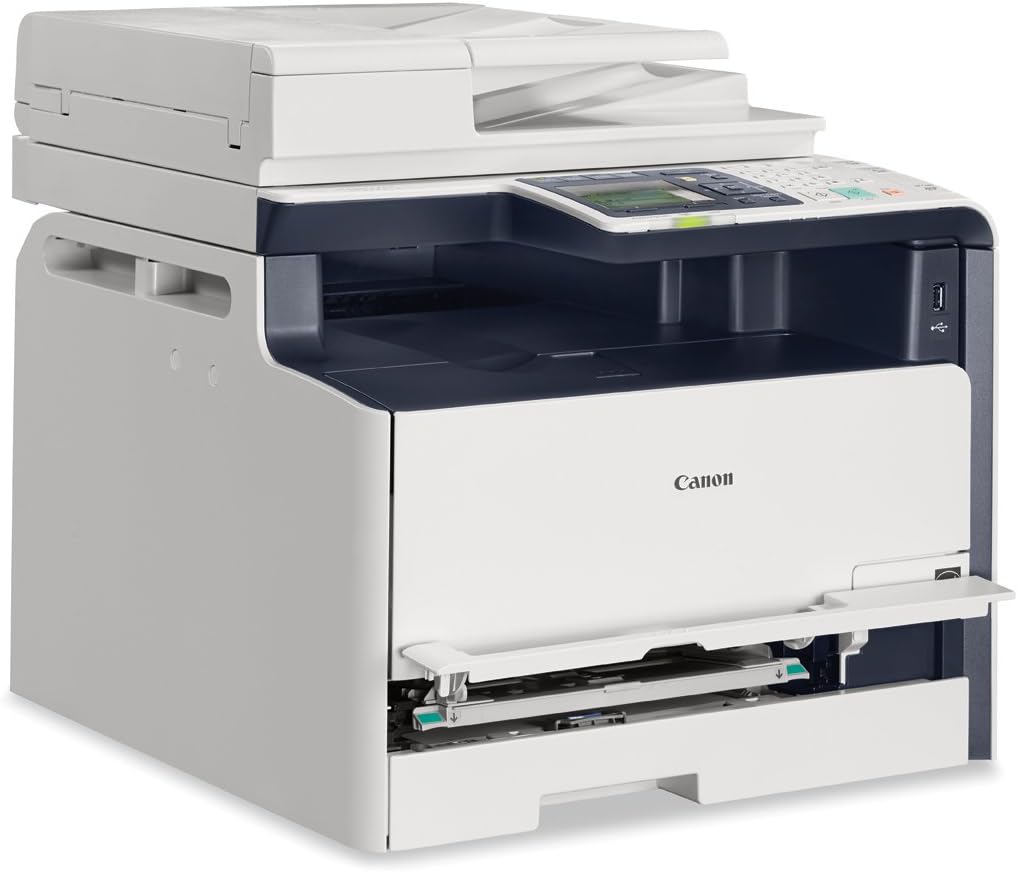
Canon Lasers imageCLASS MF8280cw Wireless 4-in-1 Color Laser Multifunction Printer with Scanner, Copier and Fax
See current price
Check the current price and availability on Amazon.com.
View on AmazonAffiliate link — we may earn a commission at no extra cost to you. Learn more
- Item Weight
- 65 Pounds
- Item model number
- 6848B001
- Manufacturer
- Canon USA (Lasers)
- Max Input Sheet Capacity
- 150
Key features
- Wireless connectivity Air Print, Google Cloud Print, Wi-Fi
- Easily access the scan, eco-copy, and secure print functions right from the control panel with the Simple Solution Keys
- Navigate through all features seamlessly with the 7-line color LCD display
- Print in black and white and color up to 14 pages per minute
- Send scanned documents and forward received faxes to a recipient through email or file server
Specifications
| Product Dimensions | 19.1 x 17 x 16.9 inches |
|---|---|
| Item Weight | 65 Pounds |
| Item model number | 6848B001 |
| Manufacturer | Canon USA (Lasers) |
| Max Input Sheet Capacity | 150 |
| Wattage | 400 watts |
| Brand | Canon |
| Connectivity Technology | Wi-Fi |
| Printing Technology | Laser |
| Special Feature | Auto-Document Feeder |
| Recommended Uses For Product | Office, Home |
| Model Name | MF8280CW |
| Printer Output | Color |
| Maximum Print Speed (Color) | 14.00 |
| Max Printspeed Monochrome | 14 ppm |
| Operating System | Linux, Windows, Mac |
| ASIN | B00PRAMVHI |
About this product
Product Description Versatile wireless multifunction printer produces professional color output with an easy to use color LCD display for seamless navigation, Secure Print for additional security and mobile printing capabilities on the go. From the Manufacturer view larger view larger Color Laser Multifunction Printer The imageCLASS MF8280Cw has 4-in-1 capabilities – you can print, copy, scan and fax all from the same machine. Print in both color and black and white at speeds of up to 14 pages per minute with a quick first print time of 18 seconds or less. The MF8280Cw is also equipped with an array of mobile capabilities for printing on the go, easy-to-use features and superior imaging technologies. With the front-loading 150-sheet paper cassette you can re-fill paper with ease. The 50-sheet automatic document feeder allows users to feed multiple pages at a time, instead of just one, which can help to save time when scanning and copying. The intuitive seven-line Color LCD Display allows users to navigate through the menu seamlessly. The wide screen and color display are easy to read, helping you to complete tasks in a breeze. Easily access the scan and eco-copy functions right from the control panel with the Simple Solution Keys. Enjoy easy paper handling with the 150-sheet front-loading cassette and 1-sheet multipurpose tray. The consumables can be accessed in the front of the machine, with the Single Cartridge System you will only have one unit to replace when the toner runs out. Speed and Quality Lightening fast print speeds: Print and copy in both color and black and white at blazing speeds of 14ppm 1 with a quick first print time of 18 seconds or less. 2 Amazing Imaging Performance: Canon’s Superior Imaging Technologies that are provide brilliant, crisp output with remarkable tone-on-tone clarity helping your image stay true to the original. Also Canon Pure Black Technology ensures the richest blacks by utilizing only the black toner instead of traditional methods of combining toner colors. Single Cartridge System: Provides excellent print quality, and can help extend the life of the machine. The Single Cartridge System contains all the essential print elements that wear out with use. This easy-to-replace cartridge simplifies maintenance by combining the toner, drum, and other parts into one unit. Genuine Cartridge: Canon GENUINE supplies are designed by Canon engineers and manufactured in Canon facilities. They are developed utilizing precise specifications, so you can be confident that your Canon device will produce high-quality results, time and time again. Ease of Use Simple Solution Keys: Easily access the scan and eco-copy functions right from the control panel with the Simple Solution Keys. Scan to USB: Easily scan to, or print documents directly from, your USB flash drive. ID Card Copy: Easily create copies of your identification cards or other small documents like passports to keep for your records on a one-sided document. Smart Document Handling: Copy, scan, and fax without having to worry about feeding originals one at a time with the 50-sheet Automatic Document Feeder. Connectivity Wireless Connectivity: Print from almost anywhere in your home or office. Mobile Printing: The Canon Mobile printing app provides convenient printing of documents, web pages, and images from select Apple iPhone’s and iPad’s. 3 Canon Mobile Printing is a free app which provides iPhone and iPad users with the ability to directly print to their Canon imageCLASS printers over a wireless network. Google Cloud Print: Wherever you are, print from your smartphone or computer using Google Cloud Print enabled apps. AirPrint: Apple AirPrint allows you to print documents, e-mails, Web pages, and photos to your compatible imageCLASS devices from your iPhone, iPad, or iPod touch. Built-in Ethernet: Easily connect to a network through a built-in Ethernet port, so everyone can easily share printing directly from their PC. With IP address filtering and MAC address filtering, you’ll prevent unwanted users from gaining access to your network and your confidential data. Super G3 Fax: Send faxes faster with a speed of 33.6 Kbps Super G3 fax technology. Operating System Windows 8, Windows 7, Windows Server 2012, Windows Server 2008 R2, Windows Server 2008, Windows Vista, Windows Server 2003, Windows XP; Mac OS X 10.5.8 & up; Linux (print only) What's in the Box MF8280Cw, setup instructions, power cord, telephone cable, registration card, starter cartridge 131, manuals, user software CD-ROM, warranty card. Specifications The MF8280Cw measures 17 (W) x 19.1 (D) x 16.9 (H) inches and weighs 52 pounds (without CRG). Compare MF8280Cw MF8580Cdw Print Speed Black/Color: up to 14 ppm (1-sided, plain paper letter) Black/Color: up to 10 ppm (2-sided, plain paper letter) Print/Copy Memory 256 MB 512 MB Duplex No All-mode (Print, Copy, Scan, Fax) Paper Capacity 150-sheet cassette, 1-sheet multipurpose tray 250-sheet cassette, 50-sheet multipurpose tray Frist Print Time Black/Color: 18 seconds or less (letter) Black/Color: 14.3 seconds or less (letter) First Copy Out Time Black/Color: Approximately 19 seconds (letter) Black: Approximately 15.3 seconds (letter) Document Feeder 50-sheet simplex 50-sheet duplex Disclaimers 1. Print speed is based on internal testing. Print speed may vary depending on the number of copies selected, as well as on the settings for size, type and orientation of paper.2. May vary depending on the output environment.3. Requires Canon Mobile Printing app available free on the App store. Compatible with iPhone 5, iPhone 4S, iPhone 4, the new iPad, iPad 2, and the original iPad running OS 5.1 - 6.0
Similar products
Compare all Canon Printers & Accessories →


See current price