


Canon· All Canon Digital Cameras →
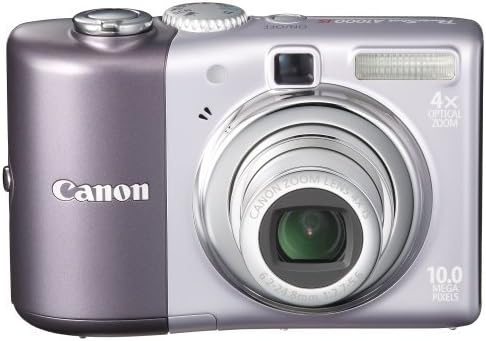
Canon Powershot A1000IS 10MP Digital Camera with 4x Optical Image Stabilized Zoom (Purple)
See current price
Check the current price and availability on Amazon.com.
View on AmazonAffiliate link — we may earn a commission at no extra cost to you. Learn more
- Display Resolution Maximum
- 115,000
- Photo Sensor Size
- 1/2.3-inch
- Photo Sensor Technology
- CCD
- Effective Still Resolution
- 10 MP
Key features
- 10-megapixel image sensor captures enough detail for photo-quality 13 x 19-inch prints
- 4x optical image-stabilized zoom lens
- DIGIC III Image Processor with Genuine Canon Face Detection
- 2.5-inch LCD and optical viewfinder; Motion Detection technology
- Capture images to SD/SDHC memory cards (not included)
Specifications
| Auto Focus Technology | Center, Multi-area, Single, Live View, Contrast Detection |
|---|---|
| Display Resolution Maximum | 115,000 |
| Photo Sensor Size | 1/2.3-inch |
| Photo Sensor Technology | CCD |
| Effective Still Resolution | 10 MP |
| White balance settings | Auto |
| Image Stabilization | Optical |
| Video Capture Resolution | 640 x 480 (30 fps) ,640 x 480 (30 fps), 320 x 240 (30 fps) |
| Expanded ISO Maximum | 1600 |
| Expanded ISO Minimum | 80 |
| Max Shutter Speed | 1/1600 seconds |
| Min Shutter Speed | 15 seconds |
| Exposure Control Type | Automatic |
| Metering Description | Multi, Center-weighted, Spot |
| Light Sensitivity | ISO 1600, ISO 80, ISO 200, ISO 100, ISO 400, ISO 800 |
| Shooting Modes | Auto, Easy, P, Portrait, Landscape, Special Scene (Night Scene, Foliage, Snow, Beach, Sunset, Fireworks, Aquarium, ISO 3200), Indoor, Kids & Pets, Night Snapshot, Movie |
| Model Name | Powershot A1000IS |
| Brand | Canon |
| Model Number | A1000 Purple |
| Color | Purple |
| Included Components | Battery, SD Card |
| Item Dimensions LxWxH | 3.78 x 1.22 x 2.48 inches |
| Item Weight | 0.34 Pounds |
| Lens Type | fixed |
| Optical Zoom | 4 |
| Digital Zoom | 4 |
| Zoom Type | Optical Zoom |
| Autofocus Points | 9 |
| Compatible Mountings | Canon EF |
| Focus Type | Auto Focus |
| Maximum Focal Length | 140 Millimeters |
| Minimum Focal Length | 35 Millimeters |
| Viewfinder Type | Optical |
| Screen Size | 2.5 Inches |
| Display Fixture Type | Fixed |
| Batteries Required? | No |
| Are Batteries Included | No |
| Rechargeable Battery Included | No |
| Battery Cell Composition | Alkaline |
| Battery Description | AA (2) NiMH batteries |
| Target Gender | Unisex |
| Connectivity Technology | USB |
| Continuous Shooting Speed | 1.3 |
| Flash Memory Type | SD/SDHC/MMC card |
| Special Feature | Image Stabilization |
| Water Resistance Level | Not Water Resistant |
| Skill Level | Professional |
| Form Factor | Compact |
| Hardware Interface | PictBridge, USB, SDHC |
| ASIN | B001IKKDKS |
About this product
From the Manufacturer The sleek design of the PowerShot A1000 IS is as refreshing as a breath of fresh air. Better still, its high-end features make everything simple: there’s the 10.0-megapixel resolution and powerful 4x optical zoom lens with Optical Image Stabilizer for sharpness along the full zoom range. A DIGIC III Image Processor with Canon Face Detection automatically lets every face stand out. Easy Mode and Easy Playback make this camera a marvel of simplicity. PowerShot A1000IS Highlights 10.0 Megapixel resolution With the PowerShot A1000 IS, dramatic, personal pictures have never been easier to shoot and share. This 10.0-megapixel camera lets you create impressive large photos of family and friends you’ll be proud to display. The high-resolution images taken by the A1000 IS can be enlarged up to 13 x 19 inches. New slim design with a 4x Optical Zoom with Optical Image Stabilizer The PowerShot A1000 IS has a 4x optical zoom lens that makes it easy to get the inspiring, emotive close-ups that will make your images lasting keepsakes. This magnificent lens gives you the power to shoot distant subjects with razor-sharp precision and stunning lifelike color, so you can brilliantly capture a bird high atop a tree, a child’s winning goal from across the stadium or a school play from the last row. Plus, thanks to Canon’s highly sophisticated Optical Image Stabilizer technology, even at maximum zoom, every image is rock steady. The A1000 IS is equipped with Canon’s acclaimed Optical Image Stabilizer Technology that automatically detects and corrects camera shake -- one of the leading causes of fuzzy or blurred shots. Even when zoomed in, you can get the steady, crisp, brilliant images you’ll be proud to shoot and share. And Canon’s Optical Image Stabilizer Technology is so convenient to use, it functions perfectly with or without a flash. High-quality 2.5-inch LCD and optical viewfinder The PowerShot A1000 IS’s 2.5-inch LCD screen gives you the big picture, whether you’re shooting, reviewing or showing off your images. This high-resolution screen offers a crisp, clear and bright picture. It also features Night Display for easy viewing in low light. DIGIC III Image Processor with Genuine Canon Face Detection AF/AE/FE/WB With DIGIC III, your images boast superior quality, the camera operates at top efficiency and battery life is enhanced. What’s more, DIGIC III enables Canon’s Face Detection, Motion Detection Technologies and Red-eye Correction to give you better, more true-to-life people shots. Simply press the shutter button halfway down, and the camera automatically pinpoints the faces in the scene and chooses the ideal focus point. The camera controls exposure settings and flash to keep every face looking bright and natural. The camera also selects and sets the optimal exposure and ISO settings automatically to keep everything looking sharp and clear. Red-eye Correction can be handled in-camera, in two ways. The Red-eye Correction during shooting uses the Face Detection Technology to recognize and remove red-eye from images as they're taken, before the file is written to the memory card. It's also possible to correct red-eye during image playback, using simple settings in the PowerShot A1000 IS's menu. iSAPS Technology is an entirely original scene-recognition technology developed for digital cameras by Canon. Using an internal database of thousands of different photos, iSAPS works with the fast DIGIC III Image Processor to improve focus speed and accuracy, as well as exposure and white balance. DIGIC III features Face Detection technologies , giving you the best possible results in any shooting situation. Face Detection AF/AE sets the focus point and exposure for the faces of your subjects. Face Detection FE adjusts the flash to correctly illuminate your subject to provide the best balance between your subject and the overall scene, eliminating the common problems of over and underexposed faces. Face Detection WB means the camera concentrates upon faces when calculating white balance for the best possible skin tones. Face Select and Track lets you highlight one face among several in a scene, and the camera concentrates on that person, even as they move around the scene. Face Detection Technology is a powerful contributing factor in Canon's Motion Detection Technology. Simply press the Face Selector Button, then the selected face is double-framed and tracked when the face moves in the frame. Motion Detection Technology works in the background to instantly evaluate how fast your subject is moving. It automatically selects and sets the optimal exposure and ISO settings to keep everything looking sharp and clear. This feature provides higher ISOs when you need it for action-stopping shutter speeds. But when no movement is detected, it sets lower ISOs for excellent color and detail. Life doesn’t give you second chances to capture special times. That’s why the PowerShot A1000 IS features ISO 1600 and High ISO Auto settings that reduce the effects of camera shake and sharpen subjects in low-light situations, giving you greater shooting flexibility. Red-eye Correction provides three options for removing red-eye from subjects in flash pictures. 1) The Red-eye Correction during shooting actually identifies and corrects red-eye in human subjects as pictures are taken. 2) The A1000 IS can be set to automatically detect and correct red-eye during image playback. 3) You can manually locate any red eyes in a scene during image playback on the LCD screen, and command the camera to remove them. Easy Mode and Easy Playback mode When you’re taking pictures, the only thing you want to think about is your subject. That’s why the PowerShot A1000 IS is equipped with Canon’s Easy Mode that works in the background to handle all the technical details for you. Now you can relax and concentrate on choosing just the right angle, capturing the perfect expression, framing your shot perfectly. To make showing off your images just as carefree, the A1000 IS features the new Easy Playback mode that makes viewing single images and slideshows on the camera effortless -- even if you’re new to digital photography! With 17 Shooting Modes including 8 Special Scene Modes, you’re ready for whatever shot comes your way. Print/Share Button for easy direct printing and downloading The PowerShot A1000 IS's Print/Share button makes direct printing easier than ever. Simply connect the A1000 IS to a Canon PIXMA Photo Printer or SELPHY Compact Photo Printer or any PictBridge compatible photo printer, press the lighted Print/Share button and print! Also use the Print/Share button to transfer images to a computer (Windows and Macintosh). Print your own ID photos in up to 28 different sizes or use the Movie Print function to output multiple stills from a recorded movie on a single sheet with a Canon SELPHY Compact Photo Printer. What's in the Box PowerShot A1000 IS Body PowerShot A1000 IS Body AA-size Alkaline Battery (x2) AA-size Alkaline Battery (x2) SD Memory Card SDC-32MB SD Memory Card SDC-32MB Wrist Strap WS-800 Wrist Strap WS-800 Digital Camera Solution CD-ROM Digital Camera Solution CD-ROM USB Interface Cable IFC-400PCU USB Interface Cable IFC-400PCU AV Cable AVC-DC400 AV Cable AVC-DC400
Similar products
Compare all Canon Digital Cameras →


See current price