



FEINODI iPhone to HDMI Adapter, 3 in 1 OTG Adapter USB Camera with 1080P Digital AV and Charging Port Splitter Compatible 13 12 11 X 8 7 6 Flash Drive MIDI Mouse Keyboard white 4.72*2.05*0.31
See current price
Check the current price and availability on Amazon.com.
View on AmazonAffiliate link — we may earn a commission at no extra cost to you. Learn more
- Item Weight
- 0.95 ounces
- Item model number
- iphone to hdmi adapter
- Manufacturer
- HSJH
- Compatible Devices
- Apple iPhone 13 iPhone 12 iPhone 11 iPhone X iPhone 8
Key features
- [1080P Video Display] The iPhone Hdmi Adapter support up to 1080P video display, which can mirror the content displayed on the device screen, such as patterns, videos, files, games, presentations, websites, music, movies, etc., to a compatible HDMI TV and display, Projectors and other compatible devices to get your high-definition experience. Supports video resolution up to 2K (3840X2160P/30HZ) and provides vivid video, ultra HD, clearer picture, and better view without any shaking.
- [Fast Transfer Speed]The maximum transmission speed can reach 60MB/S~90MB/S, which can meet your daily needs for transferring photos and files. IOS 12 and before only transfers photos or videos from the camera to your Phone or Pad supports the one-way transfer. But for iOS 13 and newer, with our USB OTG adapter, you can import & export Photos / Video / Files ( Word / PPT / Excel / PDF) / Audio by open the 'Files' App.(most of the audio can be played, but might not for some special one)
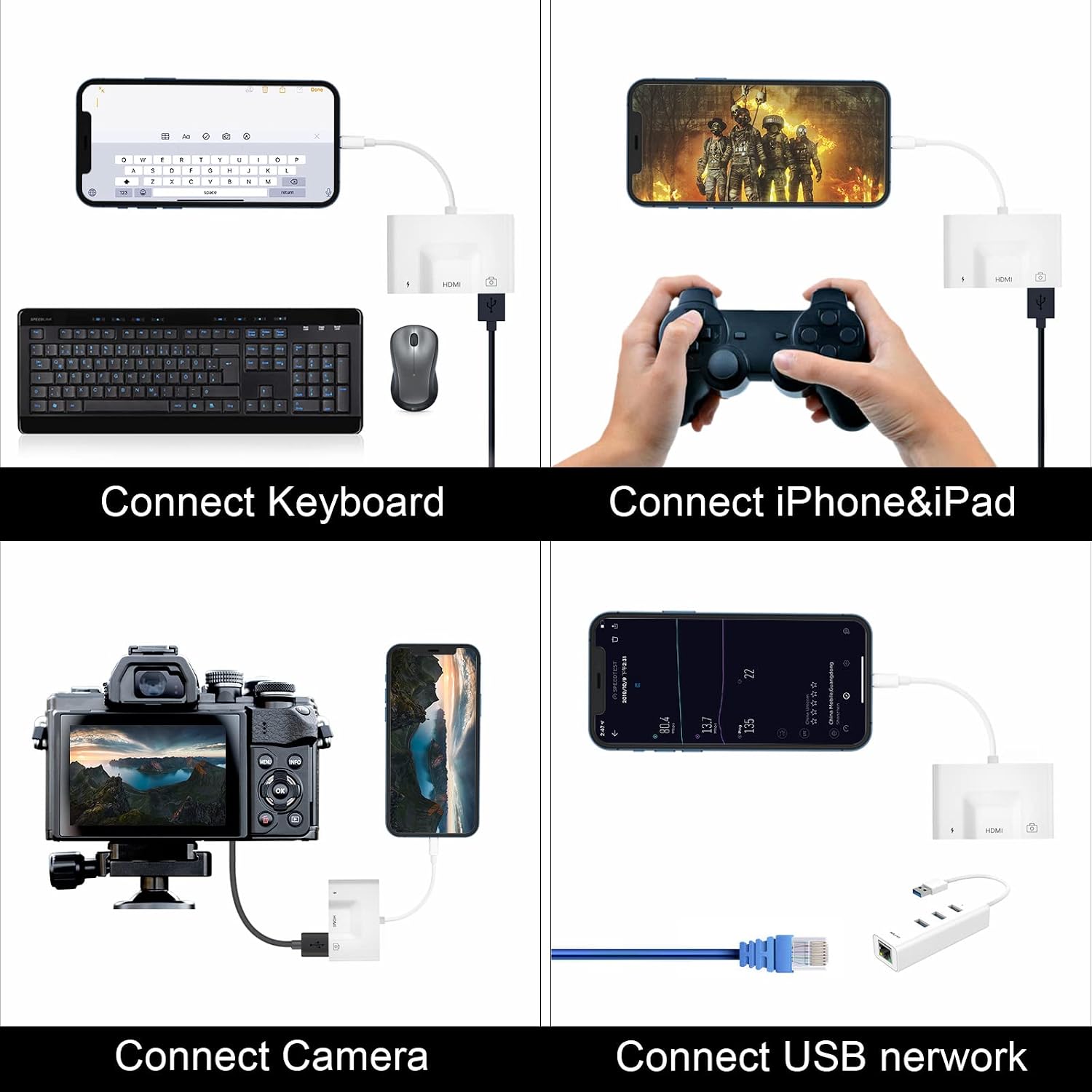
- [Strong Compatibility] This mobile multimedia iPhone to HDMI adapter has an upgraded chip with better stability and crystal sound quality. It is perfectly compatible with iPhone 13/12/12 Pro / 12 Pro Max / XS / XS Max / XR / X / 8/7/6 Plus, iPod touch. Support IOS systems and compatible with more USB devices, like Hubs, USB flash drives, Camera, PC keyboard, Guitar, MIDI keyboard, Digital piano, etc.
- [Easy to Use & Plug and Play] No Need Install Any Driver/App & Personal Hot spot or WIFI, No Need to adjust the Mirror of iPhone/iPad, insert each interface to the corresponding device, click the "Trust" button when connecting and then wait a few seconds to connect automatically, easy and quick to install, saving your much time. You can use USB data transmission and HDMI video transmission with a single adapter, which is more powerful than a single HDMI adapter.
- [After-Sales Customer Service] Our after-sales service will respond to your questions as soon as possible. Suppose there is any problem with the product quality. In that case, you can enjoy the benefit of only replacement and no repair within 45 days and provide up to one year of warranty.
Specifications
| Product Dimensions | 4.72 x 2.05 x 0.31 inches |
|---|---|
| Item Weight | 0.95 ounces |
| Item model number | iphone to hdmi adapter |
| Manufacturer | HSJH |
| Compatible Devices | Apple iPhone 13 iPhone 12 iPhone 11 iPhone X iPhone 8 |
| Specific Uses For Product | Camera,Tv |
| Connector Type | HDMI |
| Color | White |
| Item Dimensions LxWxH | 4.72 x 2.05 x 0.31 inches |
| ASIN | B09BZ7KK1S |
About this product
Overview Compatible with iPhone to HDMI Adapter is perfect for iPhone users who travel a lot. You can sit back and watch videos or play games from your iOS device on a large TV or PC monitor in the comfort of your own home or a hotel, which exports video resolutions up to 1080p HD. Tutorials for 1080P HDMI Adapter 1.Connecting iPhone,or iPod Touch, and connect an HDMI cable between the large screen and HDMI port on the adapter. 2.Click the "Screen Mirroring" on the Control Center and chose 'Air OTG Adapter.' Tutorials for transfer data between iPhone with USB Flash Disk 1. Go to "App Store" to find and download "Files" on your iPhone, and open it. 2. Go to "Browse Locations" and then find the USB flash disk folder section. 3. Start to view or transfer data between USB Flash Disk and your iPhone. NOTE:Once the video won't play, please download the VLC media player on your iPhone/iPad. And reopen the "Files" app, share the video to the VLC app for playback. Tutorials for Using Keyboard/Mouse with Your iPhone iPad 1. Go to Settings>Accessibility>Touch>Assistive Touch, to turn on "Assistive Touch." 2. Connect your iPhone with a keyboard or mouse with our USB OTG cable, start to play.(Requires a system above ios13.). Compatible devices: iPhone 13 12/mini/pro/pro max/11/pro/pro max/X/XS/XR/XS Max/8/8 plus/7/7 plus/SE/Need IOS 9.2 above version Packaging include: 1 x Use Manual 1 x Lighting to HDMI OTG Adapter
Similar products

SanDisk
SanDisk 32GB 2-Pack Ultra MicroSDHC UHS-I Memory Card (2x32GB) - SDSQUAR-032G-GN6MT
See current price

See current price