
logitech
Logitech Ergo K860 Wireless Ergonomic Keyboard with Wrist Rest and MX Vertical Wireless Mouse
See current price



logitech· All logitech Computer Accessories & Peripherals →
See current price
Check the current price and availability on Amazon.com.
View on AmazonAffiliate link — we may earn a commission at no extra cost to you. Learn more
| Standing screen display size | 3 Inches |
|---|---|
| Wireless Type | 2.4 GHz Radio Frequency |
| Brand | Logitech |
| Item model number | 920-005108 |
| Hardware Platform | Laptop |
| Operating System | Windows 8, Windows 7 |
| Item Weight | 1.73 pounds |
| Product Dimensions | 16.9 x 1.8 x 7.9 inches |
| Item Dimensions LxWxH | 16.9 x 1.8 x 7.9 inches |
| Color | Black |
| Batteries | 4 AA batteries required. (included) |
| Manufacturer | Logitech |
| Language | English |
| Compatible Devices | Laptop |
| Connectivity Technology | Wireless |
| Keyboard Description | USB |
| Special Feature | Wireless, Touch Panel |
| Number of Keys | 104 |
| Item Dimensions LxWxH | 16.9 x 1.8 x 7.9 inches |
| Material | Rubber |
| ASIN | B00DR9V1T0 |
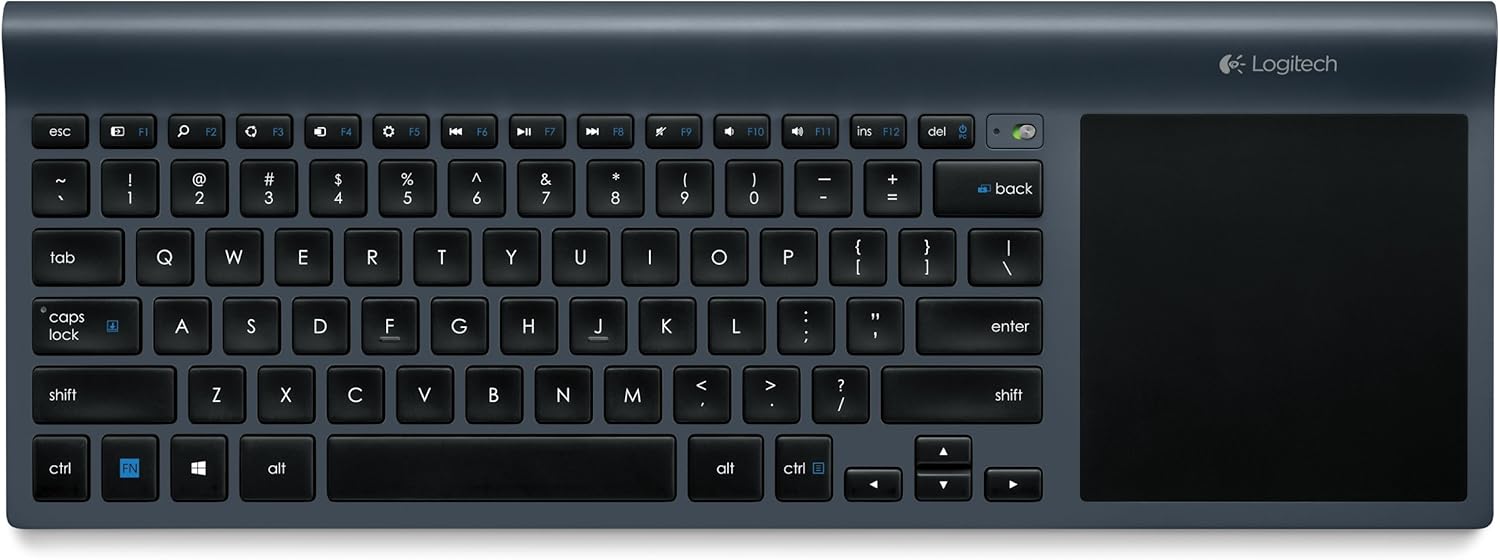
View larger Logitech Wireless All-in-One Keyboard TK820 Effortlessly type and swipe on one device. This innovative keyboard seamlessly integrates typing, touch and gestures. So now you have everything you need to control and navigate your computer in one device. With a large, built-in touch pad, you can type and swipe comfortably together. It’s a new way to navigate—especially in Windows 8. Key Features Keyboard with built-in touchpad Keyboard with built-in touchpad Large touch surface supports Windows 8 gestures Large touch surface supports Windows 8 gestures Ultra-slim, space-saving design Ultra-slim, space-saving design Logitech advanced key technology for smooth, comfortable typing Logitech advanced key technology for smooth, comfortable typing Robust wireless connection with tiny Unifying receiver Robust wireless connection with tiny Unifying receiver Compatible with Windows 8 and Windows 7 Compatible with Windows 8 and Windows 7 View larger Keyboard with built-in touchpad The keyboard and touchpad are seamlessly integrated, so you can: Use one device for typing, touch and gestures Use one device for typing, touch and gestures Switch between using the keyboard and touchpad smoothly and effortlessly Switch between using the keyboard and touchpad smoothly and effortlessly Type on the keyboard and simultaneously point, zoom and swipe on the touchpad Type on the keyboard and simultaneously point, zoom and swipe on the touchpad View larger Wireless, space-saving design Ultra-slim design takes up less space on your desk Ultra-slim design takes up less space on your desk Connects wirelessly to your computer, so there are no cables to get in the way Connects wirelessly to your computer, so there are no cables to get in the way Integrated touchpad gives you simplified navigation without needing a separate mouse Integrated touchpad gives you simplified navigation without needing a separate mouse View larger Large touch area with integrated click It’s larger than a laptop touchpad, giving you more room to: Point, zoom, pinch, swipe, scroll and click more freely Point, zoom, pinch, swipe, scroll and click more freely Perform Windows 8 gestures comfortably and smoothly Perform Windows 8 gestures comfortably and smoothly Control your cursor more precisely Control your cursor more precisely PerfectStroke key system with Incurve keys Experience superior typing comfort thanks to Logitech’s advanced key technology: The PerfectStroke key system distributes typing pressure evenly across the key surfaces. Every keystroke feels smooth and whisper-quiet—even if you strike the edge of a key. The PerfectStroke key system distributes typing pressure evenly across the key surfaces. Every keystroke feels smooth and whisper-quiet—even if you strike the edge of a key. Incurve keys with softly rounded edges help your fingers glide across the keyboard. Typing feels fluid and comfortable, hour after hour. Incurve keys with softly rounded edges help your fingers glide across the keyboard. Typing feels fluid and comfortable, hour after hour. Full range of multi-touch gestures Touchpad supports up to 13 unique Windows 8 gestures Touchpad supports up to 13 unique Windows 8 gestures Use edge gestures to switch apps and bring up the Charms Bar Use edge gestures to switch apps and bring up the Charms Bar Return to the Start Screen with a simple three-finger swipe Return to the Start Screen with a simple three-finger swipe See the Windows 8 gestures See the Windows 8 gestures View larger Unifying receiver with advanced 2.4 GHz wireless Robust wireless connection allows you to type with the keyboard on your desk or even on your lap Robust wireless connection allows you to type with the keyboard on your desk or even on your lap Hassle-free setup—plug the tiny Unifying receiver into your computer and start typing (no need to ever unplug it) Learn More > Hassle-free setup—plug the tiny Unifying receiver into your computer and start typing (no need to ever unplug it) Learn More > Fast, reliable data transmission with virtually no delays or dropouts Fast, reliable data transmission with virtually no delays or dropouts Compatibility What's in the Box Wireless All-in-One Keyboard Wireless All-in-One Keyboard 4 AA batteries (pre-installed) 4 AA batteries (pre-installed) USB Unifying receiver USB Unifying receiver User documentation User documentation Works with: Windows 8, Windows 7 Windows 8, Windows 7 Computer with available USB port Computer with available USB port Internet connection for software download Internet connection for software download Compare Which Logitech Wireless Keyboard Is Right For You? Good Better Best Wireless Keyboard K360 Wireless Solar Keyboard K750 All-in-One Keyboard TK820 What Do You Get? Stylish space-saving keyboard for a relaxed typing experienceA light-powered keyboard that charges itself whenever there’s lightBuilt-in touchpad for typing and swiping with one deviceConnection ChoicesUSB SupportAdvanced Wireless:Fast, powerful 2.4 GHz connection with 128-bit AES encryptionUnifying Receiver:Tiny wireless receiver stays in your notebook Keyboard Design Keyboard LayoutCompactFull SizeMinimalistProfileThinUltra-thin Ultra-thin Integrated Touchpad Integrated Number Pad PerfectStroke™ Key system Incurve™ keys ControlsWindows 8 Start keyWindows 8 Charms bar shortcuts Programmable F-Keys:Download additional software to change or define functionsEnhanced F-Keys: Give you additional functions on top of your F-keysSearch FeatureSystem SupportWindows XP, Vista Windows 7, 8* *Older keyboard models listed in above chart have only basic functionality on Windows RT. Software and app support aren't available for this platform. Older keyboard models listed in above chart will provide basic navigation in Windows 8 style UI. Features programmed in SetPoint software may not function in this mode. Note: Logitech mice and keyboards are Human Interface Devices (HID). HID drivers are native to modern Windows operating systems, enabling basic functionality without the need for other software. To use enhanced features, such as programming keys and buttons, additional software may be required. See the product's Support page > Downloads tab for software availability on www.logitech.com Create The Combo That Works For You Logitech has a range of portable and full-size mice that you can connect via a single, tiny receiver you leave plugged in to your laptop or keyboard. Now you can create your perfect workspace, wherever you work. Logitech Performance Mouse MX With the full-size Logitech Performance Mouse MX, you’ll have the power to achieve. You can track precisely on more surfaces—even glass tables (4 mm minimum thickness)—thanks to Logitech Darkfield Laser Tracking. Logitech Anywhere Mouse MX The portable Anywhere Mouse MX works wherever you do. Thanks to Logitech Darkfield Laser Tracking, you’ll get precise cursor control on virtually any surface, even glass tables (4 mm minimum thickness) where optical and standard laser mice fail. Logitech Wireless Mouse M510 With its contoured shape, soft rubber grips and handy controls, the Logitech Wireless Mouse M510 gives you more control, so you can do more with your mouse. Logitech Zone Touch Mouse T400 Comfortable hybrid mouse for essential Windows 8 navigation with a touch zone for vertical/horizontal scrolling plus familiar left, right, and middle buttons. Logitech Wireless Mouse M325 A better mix of precision and comfort. With its designed-for-Web scrolling, now everything you love to do online is easier.* * Designed to improve your online experience, the wheel also helps perfect scrolling when you're using other applications, such as Microsoft Office or Adobe PDF
logitech
See current price


logitech
See current price
See current price