


microsoft
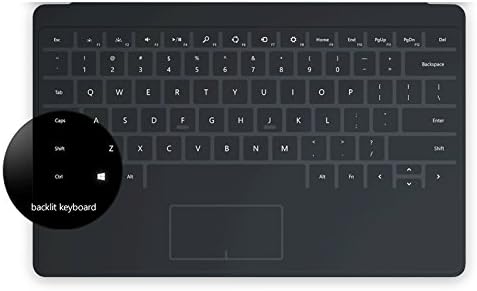
Microsoft Surface Touch Cover 2, Charcoal (N3W-00001)
See current price
Check the current price and availability on Amazon.com.
View on AmazonAffiliate link — we may earn a commission at no extra cost to you. Learn more
- Series
- Surface Touch Cover 2
- Item model number
- N3W-00001
- Hardware Platform
- Tablet
- Item Weight
- 0.32 ounces
Key features
- Touch Cover 2 for Microsoft Surface - N3W-00001
- Fixing Keyboard Problems: 1. The Basics: Detach and reattach, restart, two-button shut down 2. Look for updates 3. Check Ease of Access Functions. Clean the Keyboard Connections 4. Remove your Surface From its Case
- *Touch Cover 2 is a perfect fit for Surface RT, Surface 2, Surface Pro, or Surface Pro 2
- *Touch Cover 2 is NOT compatible with Surface Pro 3 models and newer.
- *The keys on the Surface Touch Covers don’t move, while the Surface Type Covers and Power Cover have mechanical keys that move when you press them.
- *The keys on the Surface Touch Covers don’t move, while the Surface Type Covers and Power Cover have mechanical keys that move when you press them.
Specifications
| Brand | Microsoft |
|---|---|
| Series | Surface Touch Cover 2 |
| Item model number | N3W-00001 |
| Hardware Platform | Tablet |
| Item Weight | 0.32 ounces |
| Product Dimensions | 1 x 1 x 1 inches |
| Item Dimensions LxWxH | 1 x 1 x 1 inches |
| Color | Charcoal |
| Manufacturer | Microsoft |
| Compatible Devices | Surface Pro, Surface Pro 2, Surface 2, Surface |
| Special Feature | Lighting |
| Number of Keys | 3 |
| Style | Modern |
| Item Dimensions LxWxH | 1 x 1 x 1 inches |
| Material | Other |
| Included Components | USB Cable |
| ASIN | B00NAG6OTC |
About this product
Touch Cover 2 The cover you can type on just got better with illuminated keys you can use anytime. Work and play, day and night. Thinner and lighter, the Touch Cover 2 has illuminated keys, so you can work and play in even more places, both day and night. Just click in and type up to two times faster than onscreen. Or, fold it back to return to full-touch mode. Features Innovative, lightweight and just 2.5 mm thin, this revolutionary design just got even better. Innovative, lightweight and just 2.5 mm thin, this revolutionary design just got even better. Smart enough to know when you’re deliberately pressing a key instead of just resting your hands, backlit, pressure-sensing keys also help you work in more places thanks to built-in illumination. Smart enough to know when you’re deliberately pressing a key instead of just resting your hands, backlit, pressure-sensing keys also help you work in more places thanks to built-in illumination. Fold the cover back like a magazine and keystrokes are automatically disabled to prevent accidental data input. Flip the cover back into keyboard position to return to typing mode. Fold the cover back like a magazine and keystrokes are automatically disabled to prevent accidental data input. Flip the cover back into keyboard position to return to typing mode. The smooth, spill-resistant, easy-to-clean material repels moisture and dirt. The smooth, spill-resistant, easy-to-clean material repels moisture and dirt. Navigate Windows easily with Windows shortcut keys. The built-in trackpad gives you the touch screen experience, without having to take your hands off the keyboard. Navigate Windows easily with Windows shortcut keys. The built-in trackpad gives you the touch screen experience, without having to take your hands off the keyboard. A magnetic connection without any buttons or locks to get in the way lets you instantly click in the Touch Cover — or simply pull it away to remove. A magnetic connection without any buttons or locks to get in the way lets you instantly click in the Touch Cover — or simply pull it away to remove. Supported Platforms: Surface, Surface 2, Surface Pro, Surface Pro 2 Dimensions: 7.4" x 11.0" / 2.5 mm thin Weight: 190 grams Available Colors: Black 2013 Microsoft Inc. All rights reserved.
Similar products
See current price