


Moultrie
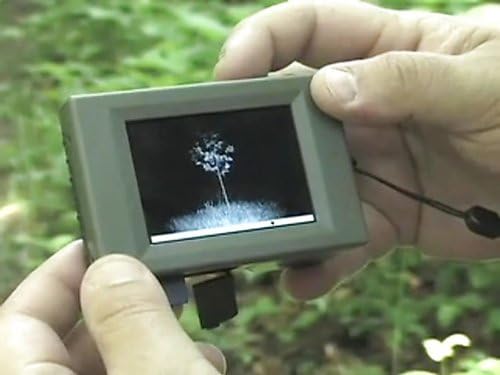
Moultrie Digital Picture Viewer, Black, 2 x 6 x 8.25
See current price
Check the current price and availability on Amazon.com.
View on AmazonAffiliate link — we may earn a commission at no extra cost to you. Learn more
- Package Weight
- 0.4 Pounds
- Item Dimensions LxWxH
- 8.25 x 2 x 2 inches
- Item Weight
- 0.1 Pounds
- Brand Name
- Moultrie
Key features
- Easily view images and videos in the field
- Ability to transfer images to storage SD card
- Ability to brighten and zoom images
- 2.8-inch TFT LCD viewing screen
Specifications
| Item Package Dimensions L x W x H | 7 x 5.6 x 2.2 inches |
|---|---|
| Package Weight | 0.4 Pounds |
| Item Dimensions LxWxH | 8.25 x 2 x 2 inches |
| Item Weight | 0.1 Pounds |
| Brand Name | Moultrie |
| Color | Black |
| Manufacturer | Pradco Outdoor Brands |
| Part Number | MFH-VWR-SD |
| Size | 2 x 6 x 8.25 |
| Sport Type | Hunting |
| Brand | Moultrie |
| Compatible Devices | Personal Computer |
| Screen Size | 2.8 Inches |
| Connectivity Technology | USB |
| ASIN | B003JTL260 |
About this product
Product Description See all of your hunting fishing or outdoor pictures without having to take your camera down or get to a TV or computer with the Moultrie Digital Picture Viewer. Use it while you're still out in the field to quickly decide which individual pictures and videos you want to transfer to your computer or delete. You can also view your shots the day of the hunt in your tree stand so you can know where you need to set up. Easily view images and videos in the field View images directly from your SD card 2.8 inch TFT LCD viewing screen Dual SD Card slots Ability to transfer images to storage SD card Mini USB connection Ability to brighten and zoom images Accepts SD memory cards up to 16GB Operates on 4 AAA batteries (not included) Compatible with all Moultrie & Wingscapes cameras Amazon.com Access your images in the field and view them directly from your camera's SD card with the hand-held Moultrie Digital Picture Viewer. Equipped with both an internal SD card that allows you to save images and an external SD card slot that allows you to view, save, and empty your camera's SD card, the Picture Viewer enables you to manage all of your game camera scouting photos and videos in the field--to increase the effectiveness of your game camera(s). In addition, the Picture Viewer's USB connection allows you to download all of your images with ease to your computer in just one step. The Picture Viewer is equipped with an internal SD card slot, an exterior SD card slot, and a USB Port for easy image management. With the Moultrie Digital Picture Viewer you can: Copy images from your camera's SD card onto the Viewer's internal SD card. Copy images from your camera's SD card onto the Viewer's internal SD card. Delete all or some of the images from your Camera's SD card in the field and put the empty SD card back into your camera. Delete all or some of the images from your Camera's SD card in the field and put the empty SD card back into your camera. Scroll through images one by one, or view the images in a slideshow. Scroll through images one by one, or view the images in a slideshow. Brighten images and zoom in on images. Brighten images and zoom in on images. Scroll through and view movies. Scroll through and view movies. Download all images via USB to your PC. Picture Viewer Menu Functions:Delete: Deletes the picture currently being viewed Delete All: Delete all the pictures on the active SD card Copy: Copies the currently viewed picture from the camera's SD card to the Internal SD card Copy All: Copies all the pictures from the Camera's SD card to the Internal SD card Brightness: Allows you to increase or decrease the picture brightness using the navigation buttons Slideshow: Scrolls through all the pictures on the active SD card. The Navigation Buttons can be used to advance or go back to previous images. Movie: Scrolls through all movies on the active SD card. Left button advanced the previous movie, Right Button advances to the previous move, and Enter Button plays the movie. Photo Index: Quickly scrolls through the pictures by index number by holding down the Right or Left Button. Enter Button allows you to view the picture. 5-Way Button Pad:Up Button: In Picture-Mode zooms-in on image 3 times before returning to normal size. In Menu-Mode or split screen mode, advances cursor to the option or picture above. Down Button: In Menu-Mode or split screen mode, advances cursor to the option or picture below. When viewing a picture, this button splits the screen so you can view 4 images simultaneously. When viewing a picture, the button also can zoom-out on the image. Left Button: advances to the previous picture or movie when viewing images. Right Button: advances to the next picture or movie when viewing images. Enter Button: selects the picture or menu item highlighted. Delete Button: Deletes the currently viewed picture/movie. Copy Button: Copies the currently viewed picture/movie to the internal SD card. Specifications:2.8-inch TFT LCD viewing screen Dual SD Card slots Mini USB connection Accepts SD memory cards up to 16GB Operates on 4 AAA batteries (not included) Download all images via USB to your PC. Picture Viewer Menu Functions: Delete: Deletes the picture currently being viewed Delete: Deletes the picture currently being viewed Delete All: Delete all the pictures on the active SD card Delete All: Delete all the pictures on the active SD card Copy: Copies the currently viewed picture from the camera's SD card to the Internal SD card Copy: Copies the currently viewed picture from the camera's SD card to the Internal SD card Copy All: Copies all the pictures from the Camera's SD card to the Internal SD card Copy All: Copies all the pictures from the Camera's SD card to the Internal SD card Brightness: Allows you to increase or decrease the picture brightness using the navigation buttons Brightness: Allows you to increase or decrease the picture brightness using the navigation buttons Slideshow: Scrolls through all the pictures on the active SD card. The Navigation Buttons can be used to advance or go back to previous images. Slideshow: Scrolls through all the pictures on the active SD card. The Navigation Buttons can be used to advance or go back to previous images. Movie: Scrolls through all movies on the active SD card. Left button advanced the previous movie, Right Button advances to the previous move, and Enter Button plays the movie. Movie: Scrolls through all movies on the active SD card. Left button advanced the previous movie, Right Button advances to the previous move, and Enter Button plays the movie. Photo Index: Quickly scrolls through the pictures by index number by holding down the Right or Left Button. Enter Button allows you to view the picture. 5-Way Button Pad:Up Button: In Picture-Mode zooms-in on image 3 times before returning to normal size. In Menu-Mode or split screen mode, advances cursor to the option or picture above. Down Button: In Menu-Mode or split screen mode, advances cursor to the option or picture below. When viewing a picture, this button splits the screen so you can view 4 images simultaneously. When viewing a picture, the button also can zoom-out on the image. Left Button: advances to the previous picture or movie when viewing images. Right Button: advances to the next picture or movie when viewing images. Enter Button: selects the picture or menu item highlighted. Delete Button: Deletes the currently viewed picture/movie. Copy Button: Copies the currently viewed picture/movie to the internal SD card. Specifications:2.8-inch TFT LCD viewing screen Dual SD Card slots Mini USB connection Accepts SD memory cards up to 16GB Operates on 4 AAA batteries (not included) Photo Index: Quickly scrolls through the pictures by index number by holding down the Right or Left Button. Enter Button allows you to view the picture. 5-Way Button Pad: Up Button: In Picture-Mode zooms-in on image 3 times before returning to normal size. In Menu-Mode or split screen mode, advances cursor to the option or picture above. Up Button: In Picture-Mode zooms-in on image 3 times before returning to normal size. In Menu-Mode or split screen mode, advances cursor to the option or picture above. Down Button: In Menu-Mode or split screen mode, advances cursor to the option or picture below. When viewing a picture, this button splits the screen so you can view 4 images simultaneously. When viewing a picture, the button also can zoom-out on the image. Down Button: In Menu-Mode or split screen mode, advances cursor to the option or picture below. When viewing a picture, this button splits the screen so you can view 4 images simultaneously. When viewing a picture, the button also can zoom-out on the image. Left Button: advances to the previous picture or movie when viewing images. Left Button: advances to the previous picture or movie when viewing images. Right Button: advances to the next picture or movie when viewing images. Right Button: advances to the next picture or movie when viewing images. Enter Button: selects the picture or menu item highlighted. Enter Button: selects the picture or menu item highlighted. Delete Button: Deletes the currently viewed picture/movie. Delete Button: Deletes the currently viewed picture/movie. Copy Button: Copies the currently viewed picture/movie to the internal SD card. Specifications:2.8-inch TFT LCD viewing screen Dual SD Card slots Mini USB connection Accepts SD memory cards up to 16GB Operates on 4 AAA batteries (not included) Copy Button: Copies the currently viewed picture/movie to the internal SD card. Specifications: 2.8-inch TFT LCD viewing screen 2.8-inch TFT LCD viewing screen Dual SD Card slots Dual SD Card slots Mini USB connection Mini USB connection Accepts SD memory cards up to 16GB Accepts SD memory cards up to 16GB Operates on 4 AAA batteries (not included) Operates on 4 AAA batteries (not included)
Similar products
Moultrie
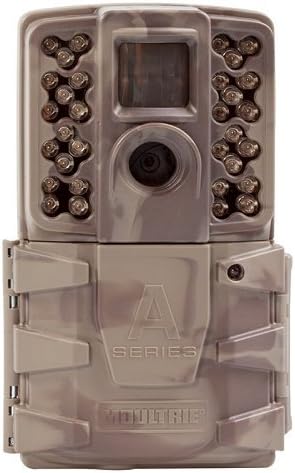
Moultrie (2017) Game Camera | All Purpose Series | 0.7s Trigger Speed | Moultrie Mobile Compatible
See current price

Moultrie
Moultrie (2017) Game Camera | All Purpose Series | 0.7s Trigger Speed | Moultrie Mobile Compatible
See current price

See current price