


Oussirro 2-Pack 3D Joycon Joystick Replacement, Analog Thumb Stick Repair Kit for N-Switch Joy Con Controller, Including Cross Screwdriver Tool + 4 Thumbstick Caps
See current price
Check the current price and availability on Amazon.com.
View on AmazonAffiliate link — we may earn a commission at no extra cost to you. Learn more
- Hardware Platform
- PC, Nintendo Switch
- Item Weight
- 2.39 ounces
- Product Dimensions
- 5.83 x 2.28 x 0.91 inches
- Item Dimensions LxWxH
- 5.83 x 2.28 x 0.91 inches
Key features
- Perfect Replacement Rather Than Buy a New Switch Joycon Controller - This N-Switch Joy Con joystick replacement repair tool kit works for Left or Right joycon joystick, replaces your broken, worn- out, insensitive or drift analog joystick. Perfect solution to bring your controller back to life!
- High Quality Accessories for Joycon Repair Replacement - Made of high quality material of plastic and metal, the joystick replacement is durable and lightweight, and the ribbon cable fits well. Easy to install, even for newcomers.
- Package Included - This repair kit is the basic but essential accessories for joystick replacement, without any other much unneccsories tool at more cost.Package include 2x Replacement Joysticks; 1x "Y" Tri-wing Screwdriver; 1x "+" Cross Screwdriver; 4x Thumbstick caps; 1x Tweezers
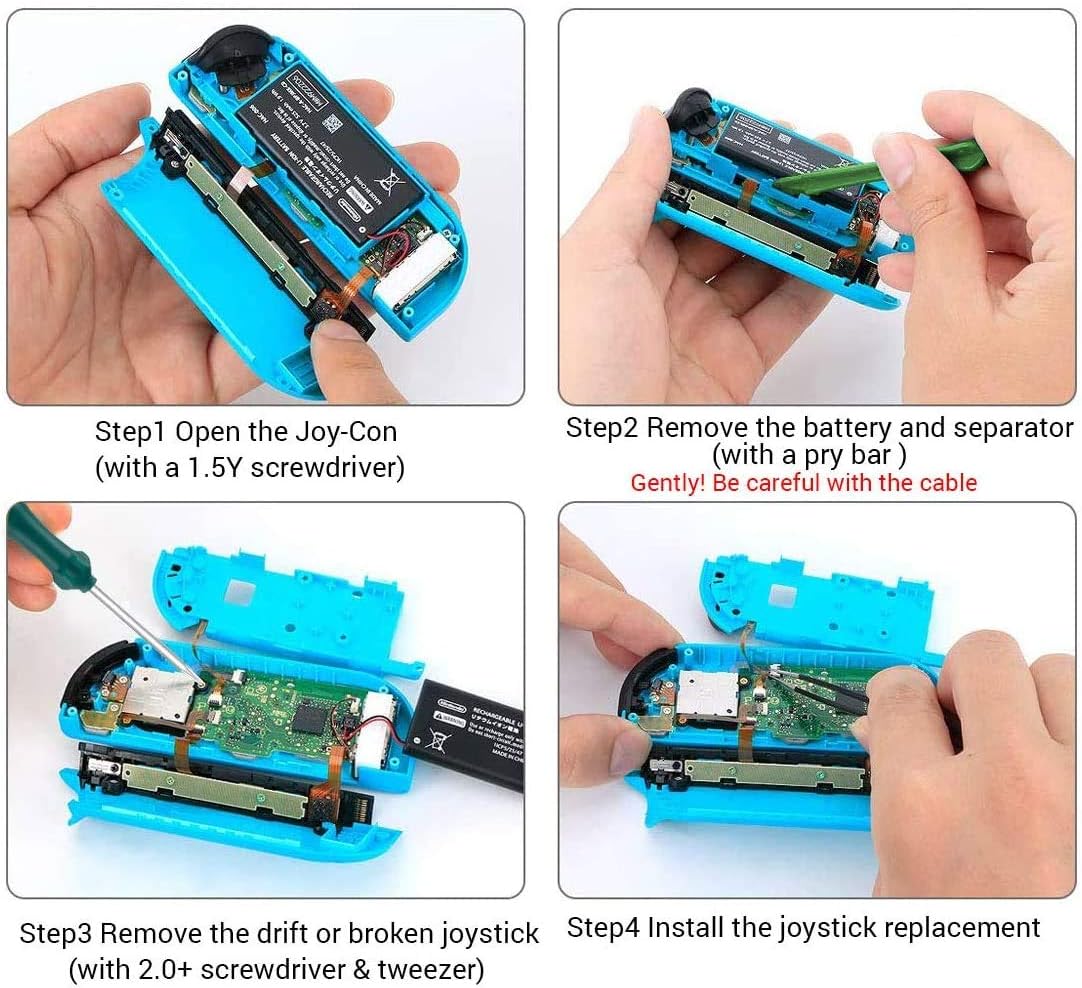
- Easy Operation for DIY - Description under below will tell you the detailed operation steps, and you can also follow some Youtube vidoes, it is very easy. Please don't forget to calibrate the joystick by using N-switch setting after installation if it drifts.
- Please Note- We are endeavour to provide first class services and products, if parcel arrived broken&missing parts&items not working well, please contact us we would arrange refund&replacement.
Specifications
| Brand | Oussirro |
|---|---|
| Hardware Platform | PC, Nintendo Switch |
| Item Weight | 2.39 ounces |
| Product Dimensions | 5.83 x 2.28 x 0.91 inches |
| Item Dimensions LxWxH | 5.83 x 2.28 x 0.91 inches |
| Manufacturer | Oussirro |
| ASIN | B088W8V78N |
About this product
Operation Steps: Step 1: Remove 4 screws Step 2: Use a pry bar to open the case Step 3: Pry out the battery (Note: pay attention to the wires) Step 4: Use a Phillips screwdriver to remove 5 screws (two types of screws) Step 5: Slowly remove the middle compartment, open the cable valve, and remove the cable with tweezers Step 6: Open the two cable valves next to the joystick, then remove the cable and remove the two screws Step 7: Replace the new joystick, and then unscrew the two screws on the joystick, insert the cable with tweezers, and close the cable valve. Step 8: Connect the compartment cables with tweezers, close the cable valve, cover the middle compartment, and tighten the screws. Step 9: Close the back cover and tighten the screws.
Similar products

SanDisk
SanDisk 32GB 2-Pack Ultra MicroSDHC UHS-I Memory Card (2x32GB) - SDSQUAR-032G-GN6MT
See current price

See current price