
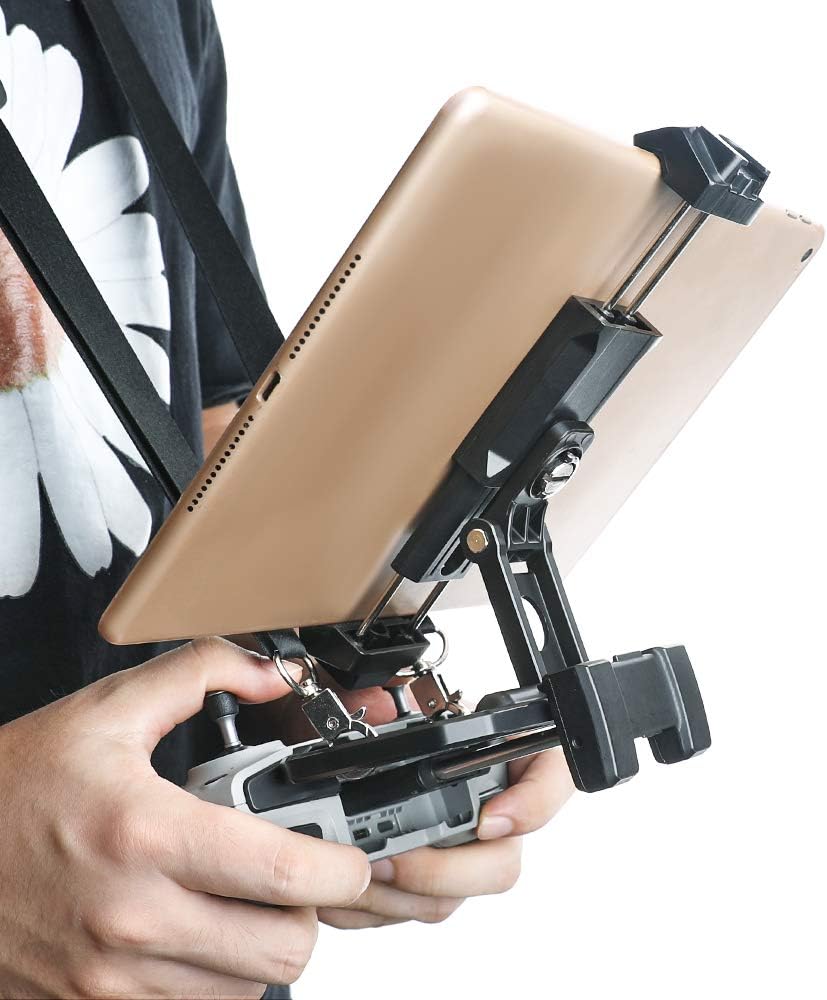


RCGEEK Tablet Stand Compatible with DJI Mavic Air 3 / Mini 2 / Mini 3 Pro/Air 2 / Mavic 3/ Air 2S Mavic 2 Pro/Zoom Spark Drone Remote Controller 4-11 inch Foldable Tablet Holder with Neck Lanyard
See current price
Check the current price and availability on Amazon.com.
View on AmazonAffiliate link — we may earn a commission at no extra cost to you. Learn more
- Item model number
- RCGGEK - 001
- Item Weight
- 4.2 ounces
- Package Dimensions
- 5.91 x 2.95 x 1.61 inches
- Color
- Black
Key features
- Fit with DJI Mavic Series (Mavic Air 3 / Mini 2 / Mini 3 Pro / Mavic 3/ Air 2 / Air 2S / Mavic 2 Pro / Mavic 2 Zoom / Mavic Mini / Mavic Air ) , Datong, FIMI X8SE 2020 and Spark Drone Remote Controller.
- Support 120-180mm (4 - 7 inch) Width Phone & Tablet, widely compatible with 11" iPad without case (Not Suitable for 12.9 inch), iPad Air 2/1, iPad Mini 4/3/2, Samsung Galaxy Tab S8/S9/S10.
- Portable design, have lanyard send for free, easy to store and use. With anti-skip silicone pad design at the bottom to improve hand feel comfort, EVA sponge protect your phone or tablet device from scratching.
- ABS+Silicone gel material, flexible design arbitrary rotation with light weight design(0.26LB),have lanyard send for free.
- Package list: 1 x Tablet Stand, 1 x Tablet / Phone Holder, 1 x Neck Lanyard, 1 x 1/4 Screw. (Note: the tablet / phone and remote contronller are not included.)
Specifications
| Brand | RCGEEK |
|---|---|
| Item model number | RCGGEK - 001 |
| Item Weight | 4.2 ounces |
| Package Dimensions | 5.91 x 2.95 x 1.61 inches |
| Color | Black |
| Manufacturer | RCGEEK |
| Country of Origin | China |
| Form Factor | Case |
| Compatible Devices | Smartphones, Tablets |
| Compatible Phone Models | Ipad,Samsung Galaxy Tab S8 |
| ASIN | B08N686V14 |
About this product
Portable Multi-Function Tablet / Phone Stand Expanded Size: 5.7 x 5.5 x 2.7 inch Folded Size: 2.7 x 5.5 x 1.1 inch Material: ABS + Silicone Gel Weight: 0.26LB Applicable Models: DJI Mavic Series Drone Datong FIMI X8SE 2020 Installation Steps: 1. Unfold teh tablet holder and connect the tablet / tablet phone holder with a 1/4 screw. 2. Mount the phone on the tablet phone holder. 3. Install the lanyard on the hole of the plate supprt (position as shown) 4. Aim at the groove of the remote control and install the tablet support on the remote control. 5. After installation, adjust the appropriate angle according to your needs and preferences. How to Use the Mobile Phone Bracket? 1. Pull down the bottom of the splint to install the phone. How to Use the Flat End Bracket? 1. Click on the top of the splint to pop up the bottom of the splint. (Press the top again when storing,shrink the bottom upwards and jam) 2. Strentch the splint up and down to install the plate. Package List: 1 x Tablet Stand 1 x Tablet / Phone Holder 1 x Neck Lanyard 1 x 1/4 Screw
Similar products


See current price