
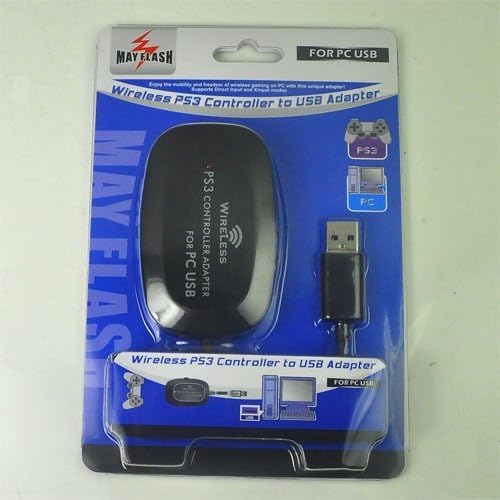


Wireless PS3 Controller to USB Adapter
See current price
Check the current price and availability on Amazon.com.
View on AmazonAffiliate link — we may earn a commission at no extra cost to you. Learn more
- Item model number
- PS3003
- Hardware Platform
- PC
- Operating System
- Windows 98,XP,Vista and Windows 7,Windows 8, 32 bit and 64 bit ,Windows 10
- Item Weight
- 0.32 ounces
Key features
- Wirelessly connects your PS3 controllers to your PC by USB
- Bluetooth v2.1 with EDR (enhanced data rate) for superior wireless performance
- Supports Turbo / Auto Fire function (see "Operation Notes").
- Supports the Games for Windows
- Supports the built-in Vibration Feedback with no delays
Specifications
| Brand | Mayflash |
|---|---|
| Item model number | PS3003 |
| Hardware Platform | PC |
| Operating System | Windows 98,XP,Vista and Windows 7,Windows 8, 32 bit and 64 bit ,Windows 10 |
| Item Weight | 0.32 ounces |
| Product Dimensions | 2 x 1 x 3 inches |
| Item Dimensions LxWxH | 2 x 1 x 3 inches |
| Color | Black |
| Manufacturer | MAYFLASH |
| Compatible Devices | PC |
| Specific Uses For Product | gaming |
| Item Dimensions LxWxH | 2 x 1 x 3 inches |
| ASIN | B00DSFW5MA |
About this product
DirectInput mode, the bundled software is needed for Vibration.Functioning distance of up to 33 feet away from adapter. Input Switch with 2 input protocol modes for extra versatility. Direct Input (standard HID protocol) supports 4 controllers at the same time. Xinput (Xbox 360 protocol) supports one controller per individual adapter. All buttons, shoulder triggers, analog sticks and their ''click-in'' tops are fully functional. Compatible with Windows 98,XP,Vista and Windows 7,Windows 8 ¼Œ32 bit and 64 bit. Operation Notes: If the Input Switch is set to the "Direct Input" mode, the controllers are recognized as standard Human Interface Device. Your controllers can be calibrated at the Windows Gamepad Setup screen. Up to four controllers can be recognized by a single adapter while in this mode. — Setting the switch to "Xinput Mode" will make it possible to fool certain PC games which lock out proper input modes from the user unless an Xbox controller is attached (for a list of these games, check Wikipedia). While in Xinput Mode Vibration Feedback is available. The drawback is that while in this mode, only one controller can be recognized by the adapter. How to set the Turbo function: To set Turbo for individual buttons, press and hold the PS logo button and the button you wish to set Turbo for. To remove the setting for that specific button, press and hold the PS logo button and the button you previously set Turbo for. To clear all Turbo settings for all buttons, quickly press the PS logo button twice within half of a second.If you want to map your buttons to Keyboard Keys, look for Joy2Key software online.
Similar products

See current price