

Tablet Replacement Parts
Compare tablet replacement parts by device compatibility, component type, fit, and installation requirements. Review specifications carefully before ordering a part for your repair.
157 products in catalog
157 results
Filters


Ipad Mini Digitizer White
Prokit For White iPad Mini Touch Screen Digitizer Complete Assembly with IC Chip & Home Button replacement with SlyPry opening tool kit Ships from CA USA
See current price




Popular brands in Tablet Replacement Parts
Tablet replacement parts can help restore a damaged, worn, or nonfunctional device without replacing the entire tablet. The right component depends on the tablet’s exact model, the failed function, and your comfort with disassembly and installation.
K-Catalog helps shoppers compare listed specifications and features before clicking through to Amazon for current product details. For broader device and accessory research, browse Computers & Accessories or explore Tablet Accessories.
How to choose the right replacement part
Start by identifying the tablet’s manufacturer, series, model designation, generation, and regional variant. Similar-looking tablets may use different screens, connectors, batteries, or internal layouts. Check the model information printed on the device, shown in its settings, or included in the original documentation.
Next, match the part to the actual symptom. A cracked outer glass may require a different component from a display with dead areas, while a tablet that will not charge could have a battery, charging port, cable, or motherboard issue. If the fault is uncertain, a repair professional can help identify the failed component before an order is placed.
Common types of tablet replacement parts
Although listings vary, tablet repair components commonly include:
- Screens and display assemblies: Used for cracked, broken, discolored, or unresponsive displays. Determine whether the listing is for glass only, a digitizer, an LCD or OLED panel, or a complete assembly.
- Batteries: Compare the stated compatibility, connector position, physical dimensions, and electrical specifications. A battery that fits the enclosure may still be incompatible with the tablet’s circuitry.
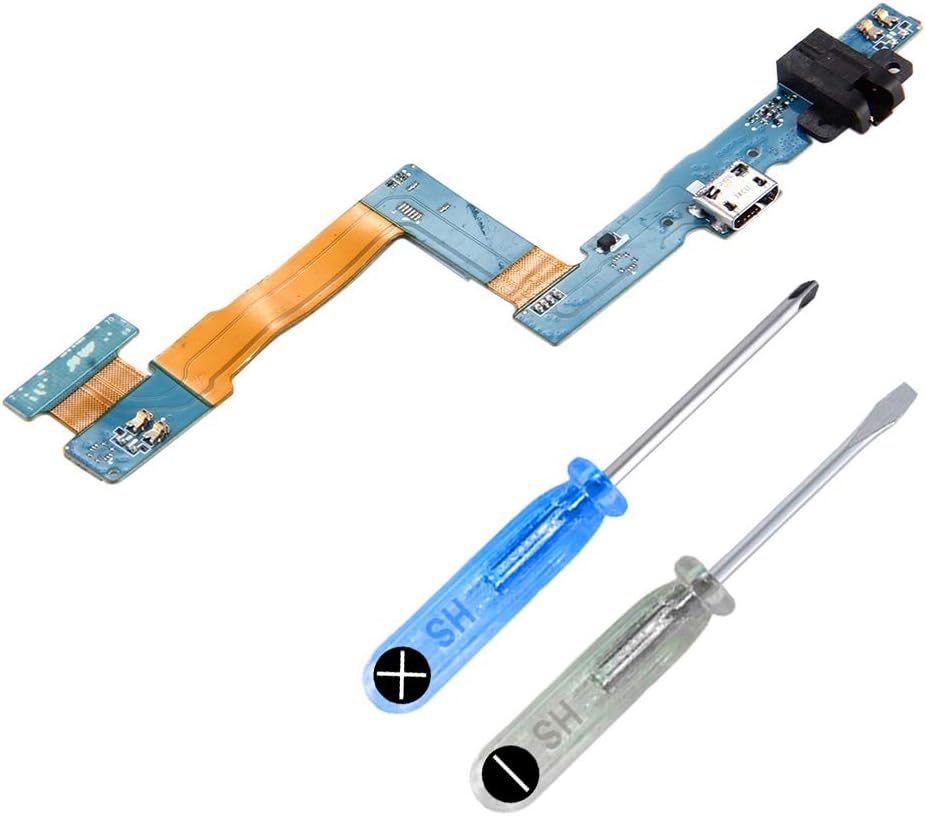
- Charging ports and flex cables: Useful when charging is intermittent or the connector is physically damaged. Confirm whether the port is mounted to a board or supplied with a replacement cable.
- Buttons, cameras, speakers, and microphones: These smaller components may address failures involving power controls, volume controls, audio, photography, or video calls.
- Internal cables, brackets, adhesives, and tools: Some repairs need supporting parts or opening tools. Check what is included rather than assuming every item shown in an image comes with the listing.
Specifications and features to compare
Compatibility is the most important specification, but it is not the only one. Compare the following details across listings:
- Exact tablet model and any compatible variants
- Part type and whether it is a standalone component or complete assembly
- Connector style, cable routing, mounting points, and board layout
- Display size, resolution, panel technology, and touch functionality where applicable
- Battery capacity, voltage, connector arrangement, and physical dimensions
- Included adhesive, tools, screws, brackets, cables, or installation accessories
- Whether the part is intended for a repair technician or do-it-yourself installation
- Seller-provided installation notes, testing guidance, and warranty information
Product photographs can help with visual comparison, but they should not replace written specifications. For internal components, connector placement and flex-cable length can matter as much as the external shape.
Brands represented in the catalog
The Tablet Replacement Parts catalog includes listings from MMOBIEL, FixCracked, JPUNG, T Phael, Zentop, Aiiworld, GoodFixer, ZTHY, TechOrbits, OGoDeal, FeiyueTech, and SRJTEK. These brands are represented across the catalog, but compatibility should be evaluated listing by listing rather than by brand name alone.
When comparing products from different brands, prioritize the exact model match, part description, included components, and installation information. A familiar brand does not compensate for an incorrect connector or incompatible tablet variant.
Repair and installation tips
Back up important data before opening a working tablet whenever possible. Power the device down, disconnect external accessories, and use appropriate tools for delicate screws, clips, ribbon cables, and adhesive. Batteries can be damaged by punctures or excessive bending, so replacement work may be better handled by a qualified technician.
Keep the original part until the repair is complete. It can help with connector comparison and may be needed if a return or compatibility issue arises. After installation, test charging, touch input, display brightness, speakers, cameras, buttons, wireless connections, and other affected functions before fully sealing the device.
If the goal is to improve the tablet setup rather than repair an internal fault, compare Computer Accessories & Peripherals and Laptop Accessories for related equipment.
Frequently asked questions
How do I find my tablet’s exact model?
Check the label on the rear case, the original packaging, or the tablet’s system settings. Use the complete model designation when comparing replacement parts, since a product family may contain several hardware variants.
Is a replacement screen the same as a replacement digitizer?
Not always. A digitizer handles touch input, while a display panel produces the image. Some listings contain one component; others provide a combined display assembly. Read the part description carefully.
How can I tell whether the battery is compatible?
Compare the tablet model, battery dimensions, connector position, voltage, and stated capacity with the original battery and the listing specifications. Do not rely on appearance alone.
Do replacement parts include installation tools?
Some listings may include tools, adhesive, cables, or other accessories, while others provide only the main component. Review the included-items section before choosing a part.
Should I install a tablet replacement part myself?
Simple external replacements may suit experienced do-it-yourself users, but tablets often contain fragile cables, adhesive-mounted batteries, and tightly fitted components. Consider professional installation when the repair involves a battery, display assembly, or uncertain internal damage.