

Video Glasses for Private, Wearable Viewing
Compare video glasses by display technology, fit, connectivity, and device compatibility. Use the catalog to narrow down wearable viewing options for home, travel, and personal entertainment.
3 products in catalog
3 results

Popular brands in Video Glasses
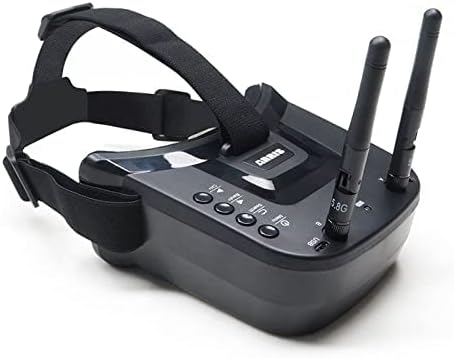
Video glasses are wearable display devices designed to bring video closer to the viewer without relying on a conventional television. Depending on the design, they may suit private viewing, portable entertainment, gaming, or use with another compatible video source.
Because comfort and compatibility can matter as much as image quality, compare the specifications carefully before choosing. Product pages can help you check the exact display, connection requirements, included accessories, and supported devices.
How to choose video glasses
Start with the way you expect to use the glasses. Someone looking for a personal display for movies may prioritize visual clarity and comfort during longer sessions. For travel, compact storage, simple controls, and compatibility with the devices already in use may be more important. Gaming and other interactive uses can place greater emphasis on connection type, responsiveness, and whether the glasses work with the intended console or computer.
Key questions to consider include:
- What video source will connect to the glasses?
- Does the product require a separate adapter, cable, battery, or control unit?
- Are the glasses intended for occasional use or extended viewing?
- Can the fit be adjusted for the wearer’s face and eyewear needs?
- Is the device compatible with the operating system, connector, or media equipment in your setup?
Types and use cases
Video glasses can differ substantially in how they present an image and connect to a source. Some are primarily personal viewing displays, while other designs may emphasize portability or integration with a broader electronics setup. The product description should clarify whether the display is self-contained or depends on a connected phone, computer, media player, or another device.
For a wider home entertainment setup, compare video glasses with Televisions to decide whether a wearable display or shared screen better suits the room. If the goal is portable playback, Streaming Media Players may also be relevant when checking how content reaches the glasses.
Display and image specifications
Display specifications affect how comfortable and useful the glasses may be for different kinds of content. Compare the stated resolution, image format, field of view, brightness, contrast, and refresh-related specifications where provided. A higher specification is not automatically the best choice for every viewer; the surrounding fit, connection, and software requirements also matter.
Look for information about whether the display is visible only to the wearer or designed to allow awareness of the surrounding environment. This distinction can affect where the glasses are practical to use. Also check whether the product supports the video formats and aspect ratios produced by your preferred source.
Comfort, fit, and everyday handling
Wearable electronics should be evaluated for physical comfort as well as technical capability. Compare the frame design, weight, nose and temple support, adjustability, and compatibility with prescription eyewear if that is relevant. Details about cable placement and controls can also make a difference during longer viewing sessions.
Consider storage and maintenance before buying. Keep lenses and display surfaces clean using the care method recommended by the manufacturer, protect the glasses from pressure or impact, and store detachable cables or adapters together. If the product uses a rechargeable battery, check its charging method and any battery-related requirements in the specifications.
Connectivity and compatible equipment
Connection details are among the most important specifications to verify. Check the available ports, cable types, wireless requirements, adapters, and supported source devices. A product may be a poor match if it cannot connect directly to the phone, computer, console, or media player you plan to use.
It can also help to identify every component in the viewing chain: source device, adapter, cable, glasses, and any power supply. For disc-based playback, compare the glasses’ requirements with Blu-ray Players & Recorders or DVD Players & Recorders. Accessories may be useful when you need compatible cables, adapters, or related equipment.
Brands represented in the catalog
The Video Glasses catalog includes products from ARRIS, Avegant, and LEADEN. These brands are represented in this category, but features can vary by product. Compare each listing’s specifications rather than choosing by brand name alone, with particular attention to display details, connection requirements, fit, power, and included components.
Frequently asked questions
Are video glasses the same as virtual reality headsets?
Not necessarily. Video glasses are generally centered on viewing video through a wearable display, while virtual reality headsets are designed for immersive digital environments. Check the product description for the intended use and supported content.
Can video glasses connect to any television or media player?
Compatibility depends on the glasses’ inputs, required adapters, supported signals, and the output options of the source device. Confirm these details for both products before purchasing.
Are video glasses suitable for long viewing sessions?
Suitability varies by frame design, weight, display characteristics, adjustability, and personal comfort. Compare ergonomic details and follow the manufacturer’s guidance for use.
Do video glasses work with prescription eyewear?
Some designs may accommodate prescription glasses, while others may require a different fit or corrective insert. Review the product specifications and dimensions if this is important.
What should be checked before buying video glasses?
Verify the display specifications, connection method, supported devices, power requirements, fit, included accessories, and storage or care instructions. Shoppers can check the current price on Amazon after comparing these details.