

Fax Machines for Home and Office
Compare fax machines for document transmission, printing, scanning, and copying. Review connectivity, paper handling, consumables, and office compatibility before choosing a model.
11 products in catalog
11 results
Filters
Availability
Price

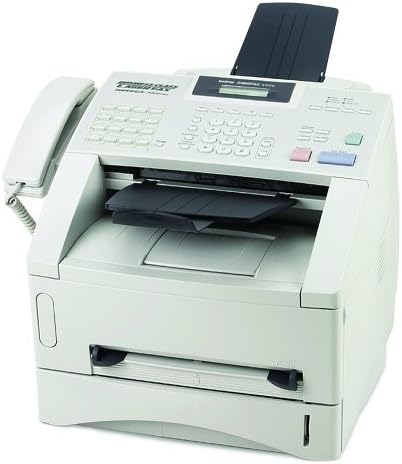




Popular brands in Fax Machines
Fax machines remain useful for offices, medical practices, legal work, and other settings where sending signed or sensitive documents by fax is part of the workflow. The right choice depends on whether you need a dedicated fax device or a multifunction machine that combines faxing with printing, scanning, and copying.
Use this catalog to compare specifications and features from brands represented here, including Brother, HP, Brother Printer, Panasonic, Funey, PostageInk.com, and WUAI-Women. Pay close attention to line compatibility, document handling, and ongoing supply requirements rather than choosing based on appearance alone.
How to choose a fax machine
Start by considering how your office sends and receives documents. Occasional users may prefer a compact device with straightforward controls, while a busier office may benefit from automatic document handling, larger paper capacity, and features that reduce manual steps.
Ask these questions before comparing individual models:
- Do you need faxing only, or should the device also print, scan, and copy?
- Will it connect to a traditional phone line, a digital phone service, or an office network?
- What document sizes and paper types must it handle?
- How often will documents be sent or received?
- Is a compact footprint more important than higher-capacity paper handling?
If faxing is only one part of your office setup, compare this category with Printers & Accessories and Scanners & Accessories to evaluate multifunction alternatives.
Main types of fax machines
Dedicated fax machines
A dedicated fax machine focuses on sending and receiving faxes. This can suit an office with an established fax process that does not need built-in printing or scanning. Dedicated models may also be easier to operate when several people share the device and only need basic fax controls.
Multifunction fax machines
Multifunction models combine faxing with printing, scanning, and copying. They can save desk space and simplify document workflows, especially when staff frequently scan a document before faxing it or need a printed copy after transmission. Compare each function separately, since print quality, scan handling, and fax features may vary between models.
Compact office fax machines
Smaller units are useful where desk or counter space is limited. Check the device dimensions, paper-loading method, control layout, and access points for replacing supplies. A compact design is most practical when document volume is modest and frequent paper replenishment is acceptable.
Features and specifications to compare
Phone-line compatibility is one of the most important checks. Confirm that the machine works with the phone service available at the installation site. Traditional analog lines and digital or internet-based phone systems can require different setup considerations. If the office uses VoIP, consult the service provider and the machine documentation before purchase.
Document handling affects convenience and productivity. Look for details about the automatic document feeder, supported document sizes, paper input capacity, output arrangement, and whether documents can be sent individually or in a batch. A flatbed scanner can be useful for books, cards, or delicate originals, while a feeder is more convenient for multi-page paperwork.
Multifunction capabilities deserve separate attention. Compare whether a model can print, scan, and copy, along with the connection options used for computers or office networks. If multiple employees will use the device, consider whether the controls and setup support shared office use.
Memory and transmission management can matter when the line is busy or documents arrive while paper is unavailable. Check the listed fax memory, automatic redial or retry functions, broadcast capabilities, and confirmation options if these are important to your workflow.
Consumables and maintenance should also influence the decision. Determine whether the machine uses ink cartridges, toner, thermal paper, or another supply format. Check how supplies are installed, whether replacement paper is easy to source, and whether the device requires regular cleaning or other routine care.
Brands represented in the catalog
This category includes products associated with Brother, HP, Brother Printer, Panasonic, Funey, PostageInk.com, and WUAI-Women. Brand availability can change as the catalog develops, so compare the specifications of individual listings rather than assuming that every model from a brand has the same capabilities. Pay particular attention to connectivity, consumables, document handling, and included functions.
Setup and everyday-use tips
Place the fax machine near the appropriate phone connection and leave enough room to load paper, open covers, and remove documents. Keep the paper path clean and use supplies that match the manufacturer’s specifications. For confidential documents, consider who can access received pages and whether the machine should be positioned in a controlled area.
Before relying on a new device, verify the phone connection and send a test fax to confirm dialing, transmission, and reception. Offices replacing an older machine should also check whether existing phone cabling, extensions, computer connections, and document workflows will work with the new model.
For related office equipment, browse Telephones & Accessories, Other Office Equipment, or the broader Office Electronics category.
Frequently asked questions
Do fax machines also print and scan?
Some do. Multifunction fax machines may include printing, scanning, and copying, while dedicated fax machines focus primarily on fax transmission and reception. Compare the listed functions for each model.
Can a fax machine work with VoIP?
It may, but compatibility depends on the phone service, adapter, network settings, and device. Confirm requirements with the service provider and consult the manufacturer’s documentation before purchasing.
What paper should a fax machine use?
The correct paper depends on the machine. Check the listed paper size, paper type, and supply requirements, especially if choosing between thermal, ink-based, or toner-based equipment.
Is an automatic document feeder important?
It is helpful when sending or copying multi-page documents. For occasional single-page use, a flatbed or manual document-loading design may be sufficient.
What should be checked before replacing an old fax machine?
Confirm phone-line compatibility, connection options, document sizes, paper requirements, consumables, and the functions your current workflow depends on. A test transmission after setup can help verify operation.