

Satellite Television Equipment
Compare satellite television equipment by compatibility, installation needs, signal considerations, and connection type. Review specifications and features before clicking through to see current availability on Amazon.
34 products in catalog
34 results
Filters


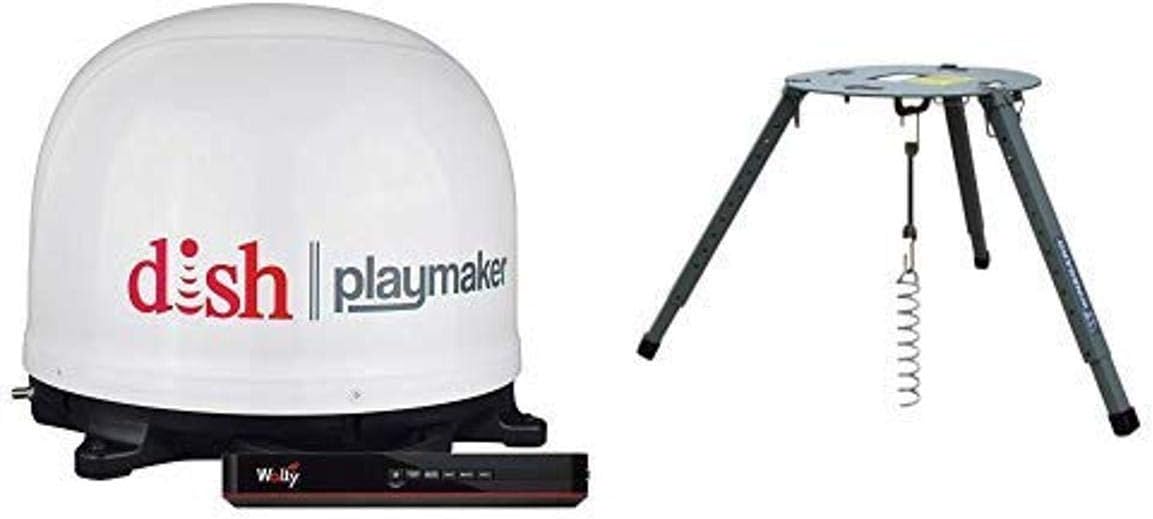
Winegard
Winegard PL7000R Dish Playmaker Portable Antenna with Wally HD Receiver & Portable Tripod Mount
See current price


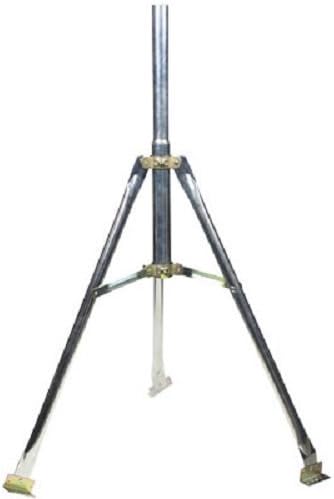
Perfect 10
Satellite Tripod for Directv or Dish Network 2" & 1 5/8" OD Satellite Mount work on FTA as well
See current price
Perfect 10
Satellite Tripod for Directv or Dish Network 2" & 1 5/8" OD Satellite Mount work on FTA as well
See current price


![STEREN Satellite Tripod for Directv or Dish Network 2" Inch & 1 5/8" OD Satellite Mount Work on FTA as Well [221-120]](https://m.media-amazon.com/images/I/61Ltra9QoiL._AC_SL1500_.jpg)

Popular brands in Satellite Television
Satellite television equipment can include the components used to receive, distribute, connect, or improve a satellite TV signal. The right choice depends on your existing system, service provider, installation location, and the type of connection your television or receiver supports.
Use this catalog to compare specifications and features across available products. If you are building a broader home entertainment setup, you can also browse Televisions, Accessories, and other categories within Television & Video.
How to choose satellite television equipment
Start by identifying what part of the system you need. Replacing a missing cable or connector is a different task from installing a satellite dish, changing a receiver, or improving signal distribution. Checking your current equipment before shopping can help avoid compatibility problems.
Consider these questions:
- Is the product intended for installation, signal reception, distribution, or connection?
- Will it work with your satellite service and existing receiver or dish hardware?
- Does the installation require indoor or outdoor use?
- What cable type, connector, mounting arrangement, or power source does it require?
- Is the product suitable for a single television or a setup with multiple rooms?
Product listings can provide important details about supported connections, included components, dimensions, weather resistance, and installation requirements. Compare those specifications rather than choosing based only on appearance.
Main types of satellite TV equipment
Satellite dishes and reception components
A dish and its reception hardware must be positioned with a clear view of the relevant part of the sky. When comparing reception components, check mounting compatibility, outdoor durability, connector type, and whether the product is intended to replace an existing part or support a new installation.
Receivers and related hardware
A receiver interprets the incoming satellite signal and passes content to the television or another component. Compatibility is especially important here: check supported signal formats, outputs, control options, and whether the receiver is designed for the service or system you use. A receiver that uses an incompatible connection or service standard may not be useful in an existing setup.
Cables, connectors, and signal distribution
Cables and connectors affect how equipment is joined together. Compare connector style, cable length, shielding, indoor or outdoor suitability, and the required signal path. For multi-room installations, distribution equipment may need to support the number of connected devices and the signal configuration used by the system.
Mounts, installation tools, and signal aids
Mounting hardware needs to match the dish or component and the surface where it will be installed. Signal meters and related tools can help with alignment, while grounding and weather-protection accessories may be relevant for outdoor installations. Review the included hardware carefully; a product may be designed as a component rather than a complete installation kit.
Specifications and features to compare
The most useful specifications vary by product type, but these details commonly deserve attention:
- Compatibility: Confirm the product works with your provider, receiver, dish, television, or existing cabling.
- Connections: Check input and output types, connector design, and whether adapters are needed.
- Installation: Look for mounting method, placement requirements, included hardware, and access for future adjustments.
- Outdoor durability: For exterior components, review weather-resistant construction and any grounding or protection guidance.
- Size and fit: Compare dimensions with the available mounting space, cabinet, wall, or equipment rack.
- Power requirements: Determine whether the item is passive, battery-powered, or requires a dedicated power connection.
- Included components: Check whether cables, brackets, connectors, remotes, or other required parts are included.
If a listing does not clearly identify compatibility, compare the product documentation with the labels and specifications on your current equipment before ordering.
Brands represented in the catalog
The catalog includes satellite television products from Winegard, Pace International, Dish Network, PACE INT'L, Perfect 10, SAMEB, Lava Electronics, HotCat, STEREN, KING, TII Network Technologies, and Esky. These brands are represented across the available catalog; product suitability still depends on the individual specifications and your installation requirements.
For alternative ways to watch or manage television content, compare Streaming Media Players. Physical media options are covered in Blu-ray Players & Recorders and DVD Players & Recorders. Analog-to-Digital (DTV) Converters address a different type of television signal conversion and should not be confused with satellite receivers.
Installation and compatibility tips
Before installing outdoor equipment, check local requirements, mounting-surface strength, cable routing, and safe access to the installation area. Keep connectors protected from moisture and avoid sharp bends or unnecessary cable runs. If the system includes grounding, power, or roof-mounted equipment, follow the manufacturer’s instructions and consider professional installation when the work involves electrical or difficult-to-reach areas.
Record the model and connection details of your existing receiver, dish, television, and cables. This makes it easier to compare listings and identify whether you need a complete replacement, a single component, or only an accessory. After installation, verify that each connection is secure and that the receiver and television are set to the correct input.
Frequently asked questions
What should I check before buying satellite television equipment?
Confirm your service compatibility, connection types, installation location, dimensions, power needs, and whether the listing includes the components required for your intended setup.
Can any satellite receiver work with any satellite service?
No. Receivers can depend on service-specific hardware, signal standards, conditional access, and connection requirements. Check compatibility with your provider and existing equipment.
Do outdoor satellite components need special protection?
Outdoor components should be suitable for exterior exposure and installed with appropriate weather protection, cable routing, and grounding according to the manufacturer’s guidance.
How do I know whether I need a cable, connector, or adapter?
Compare the ports and connectors on both ends of the signal path. If they differ, an adapter may be needed, but confirm that it supports the required signal and connection type.
Is satellite television equipment difficult to install?
Difficulty depends on the component and location. Replacing a cable may be simple, while dish alignment, roof mounting, grounding, and multi-room distribution may require specialized knowledge or professional help.