
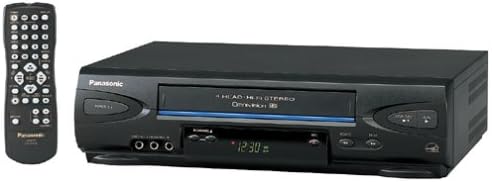
VCRs for VHS Playback and Recording
Compare VCRs by VHS compatibility, playback and recording features, connection options, and condition-related considerations for older home video collections.
10 products in catalog
10 results
Filters


Popular brands in VCRs
VCRs remain useful for playing VHS tapes, reviewing home movies, and connecting older video equipment to a television. The right choice depends less on modern streaming features and more on tape compatibility, video connections, recording controls, and how well the unit fits the rest of your setup.
Use this catalog to compare specifications and features from brands represented here, then check the product listing on Amazon for current availability and detailed seller information.
How to choose a VCR
Start by identifying what you need the player to do. If you only want to watch existing tapes, straightforward playback may be enough. If you plan to make recordings, look for recording controls, timer functions, and the type of blank media the unit supports. For a collection of family tapes, dependable playback and gentle tape handling may matter more than extra controls.
Compatibility is especially important with older equipment. Check whether the VCR works with the tape format you own and whether its output connections match your television, receiver, capture device, or converter. Older TVs and newer flat-panel displays may require different connection approaches, so review the specifications before choosing.
Types and uses to consider
Because this category does not have listed subcategories, compare each VCR by its intended role:
- Playback-focused VCRs: Suitable for watching a library of prerecorded VHS tapes or home recordings.
- Recording VCRs: Better for users who need to record television content or transfer video between compatible devices.
- VCRs for archiving: Useful when the goal is to view, organize, or digitize older recordings through a separate capture device.
- Replacement units: A practical option when an existing VCR no longer loads, tracks, rewinds, or ejects tapes reliably.
A VCR does not automatically convert an analog recording into a modern digital file. For digitization, shoppers generally need a compatible capture device and suitable computer software in addition to a working player.
Key features and specifications to compare
Pay attention to the details that affect everyday operation:
- Tape format: Confirm that the player supports the tapes in your collection. VHS-family formats should not be assumed to be interchangeable.
- Playback functions: Search for features such as rewind, fast-forward, pause, slow playback, frame advance, and tracking adjustment when those controls are important for older recordings.
- Recording features: If recording is required, compare timer programming, recording modes, input selection, and available controls.
- Video and audio outputs: Match the VCR’s outputs with the inputs on your television or other equipment. You may need an adapter or converter if the connection types differ.
- Signal compatibility: Consider the television, broadcast source, and region where the equipment will be used. Compatibility can affect whether a picture appears correctly.
- Remote control: A remote can make timer setup, tracking, input selection, and playback adjustments easier, especially when the front-panel controls are limited.
- Physical condition: For older equipment, inspect the listing details for information about included cables, remote availability, cosmetic wear, and operating condition.
Brands represented in the catalog
Panasonic and Sony are the brands represented in this VCR catalog. Brand name alone does not determine whether a particular unit suits your needs, so compare the individual listing’s format support, connections, controls, and stated condition. This is particularly important for older electronics, where included accessories and exact specifications can vary between products.
Connecting a VCR to a modern setup
Before buying, map the signal path from the VCR to the display. A television with compatible analog inputs may connect directly, while a newer display may need an appropriate converter or another intermediary device. Check whether the selected equipment carries both video and audio, and make sure the cable type matches the ports on each device.
For transferring VHS recordings, connect the VCR to a compatible capture solution rather than expecting a television connection to create a digital copy. Protect valuable tapes by using clean, compatible equipment and avoiding repeated playback when a tape shows signs of damage, mold, or sticking.
You can also browse Televisions when choosing a display, or compare Accessories for cables and related setup components. For a newer viewing system, Streaming Media Players offer a different way to access digital content.
Alternatives and related equipment
A VCR is most appropriate when VHS playback or recording is the priority. For other physical media, compare DVD Players & Recorders or Blu-ray Players & Recorders. If the goal is to connect older broadcast equipment to a newer television, Analog-to-Digital (DTV) Converters may also be relevant, although they do not replace a VCR’s tape functions.
Frequently asked questions
What can a VCR play?
A VCR is designed for compatible videotapes, most commonly VHS-family media. Check the exact tape format in the product specifications before buying.
Can a VCR record television programs?
Some VCRs support recording, but capabilities vary. Compare the recording controls, timer functions, inputs, and compatibility with the intended television or signal source.
Can a VCR connect to a modern TV?
It may, depending on the television’s available inputs. If the connections do not match, an appropriate adapter or converter may be needed; verify the complete setup before purchase.
Does a VCR convert VHS tapes to digital files?
No. A VCR plays the analog tape. Digital archiving normally requires additional capture hardware and software that work with the VCR’s output.
What should I check when buying an older VCR?
Review tape-format support, outputs, playback and recording functions, remote availability, included accessories, and the listing’s information about operating condition.
Are Panasonic and Sony VCRs interchangeable?
They may perform similar basic functions, but individual models can differ in format support, connections, controls, and accessories. Compare specifications for the specific unit rather than relying only on the brand.